
4K resolution is now common in TVs, monitors, gaming systems, streaming, cameras and digital video. But 4K is only one part of the picture.
The most common consumer 4K resolution is 3840 × 2160 pixels, which contains 8,294,400 pixels—four times the total pixel count of 1920 × 1080 Full HD.
That extra resolution can provide more visible detail, sharper text and cleaner fine textures. But whether you can actually see a meaningful difference depends on more than the number of pixels.
Screen size, viewing distance, source quality, HDR, contrast, brightness, refresh rate, image processing and the capabilities of your hardware all matter.
This guide explains what 4K actually means, how it compares with other resolutions, how native and upscaled 4K differ, and what you should consider when choosing a 4K TV, monitor or gaming setup.
Hands-on testing by Yasmin Fatima
4K Resolution at a Glance
| Specification | 4K UHD |
|---|---|
| Common consumer resolution | 3840 × 2160 pixels |
| Total pixels | 8,294,400 |
| Common aspect ratio | 16:9 |
| Vertical resolution | 2160 pixels |
| Common name | Ultra HD / UHD |
| Common uses | TVs, monitors, gaming, streaming and video |
The term 4K is commonly used for consumer displays and video with approximately 4,000 pixels across the horizontal dimension.
For consumer TVs and monitors, 4K normally means 3840 × 2160, also known as 4K UHD.
What Is 4K Resolution?
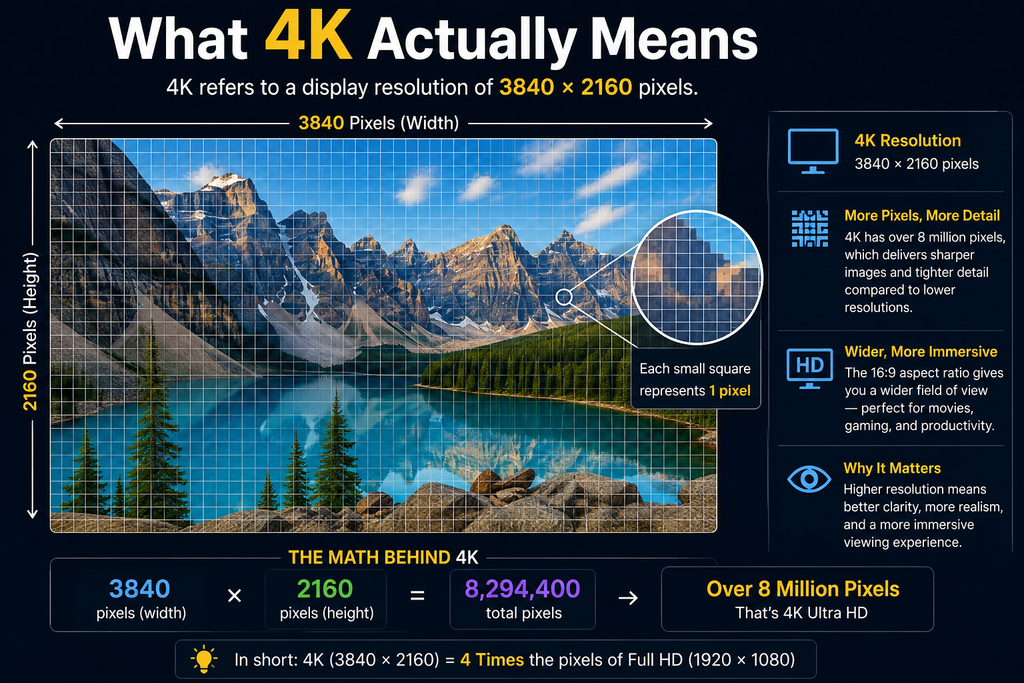
4K resolution describes an image with roughly 4,000 pixels across its horizontal dimension.
For consumer electronics, the standard you will encounter most often is:
3840 × 2160
Multiplying those dimensions gives:
3840 × 2160 = 8,294,400 pixels
That is approximately 8.3 million pixels.
The name “4K” comes from the approximate horizontal pixel count. The “2160p” name refers to the vertical resolution.
4K UHD vs DCI 4K
“4K” can refer to more than one technical format.
4K UHD
- 3840 × 2160 pixels
- 16:9 aspect ratio
- Common in consumer TVs and monitors
- Common in streaming and consumer video
DCI 4K
- 4096 × 2160 pixels
- Used primarily in digital cinema and professional production
- Slightly wider than 4K UHD
For a typical television or computer monitor, 4K generally means 3840 × 2160 unless the manufacturer specifies otherwise.
How We Research 4K Information
We research 4K and display-related information using publicly available technical specifications, manufacturer documentation, industry standards and other authoritative sources. We aim to distinguish measurable specifications from marketing terminology and explain what those specifications mean in practical use. When requirements vary by device, service or implementation, we identify that variation rather than presenting one number as universally applicable.
How Many Pixels Does 4K Have?
A 4K UHD image contains exactly:
8,294,400 pixels
For context:
| Resolution | Dimensions | Approx. total pixels |
|---|---|---|
| 720p | 1280 × 720 | 0.9 million |
| 1080p | 1920 × 1080 | 2.1 million |
| 1440p | 2560 × 1440 | 3.7 million |
| 4K UHD | 3840 × 2160 | 8.3 million |
| 8K UHD | 7680 × 4320 | 33.2 million |
4K therefore has approximately four times the total number of pixels as 1080p and approximately twice as many as 1440p.
That does not mean it will always look four times better.
The physical size of the screen and the distance between you and the display determine how much of that additional detail your eyes can actually resolve.
4K vs 1080p vs 1440p vs 8K
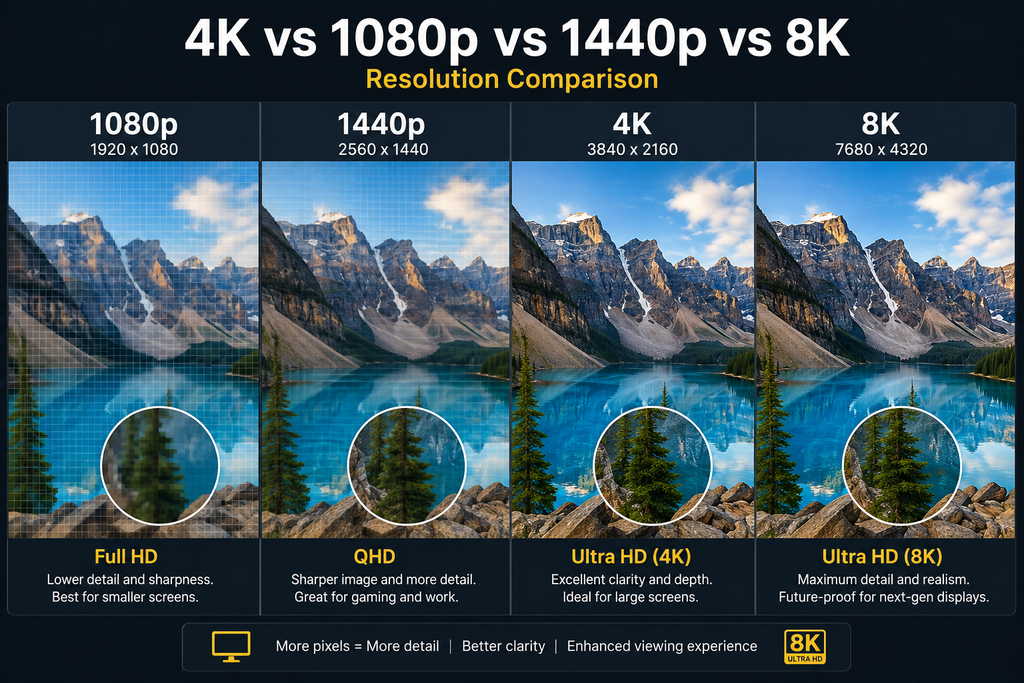
Pixel counts are useful, but they don’t tell the entire story.
1080p
1080p remains perfectly usable for many applications. It can look good on smaller screens and when viewed from an appropriate distance.
1440p
1440p sits between 1080p and 4K in pixel count and is particularly common among PC monitors and gaming displays.
4K
4K provides a substantial increase in pixel density and is widely used for modern TVs, monitors, gaming and video.
8K
8K quadruples the total pixel count of 4K UHD, but the practical benefit depends heavily on screen size, viewing distance and the availability and quality of 8K content.
The practical difference
The important question isn’t simply:
“Which resolution has more pixels?”
It is:
“Will the additional pixels make a meaningful difference on the display and in the conditions where I use it?”
Does 4K Actually Look Better Than 1080p?
Often, yes—but not in every situation.
4K provides four times the total pixel count of 1080p, giving the display more information with which to reproduce fine detail.
You may notice:
- sharper text
- finer textures
- cleaner edges
- more visible detail in complex scenes
- less obvious pixel structure on large displays
However, the difference becomes less obvious when:
- the screen is small
- you sit relatively far away
- the source is heavily compressed
- the original content is low quality
- the display itself has poor image quality
A high-quality 1080p source can sometimes look better than a poorly compressed 4K stream.
The reason is simple:
Resolution describes how many pixels an image contains. It does not describe the quality of the information contained in those pixels.
What Actually Determines How Good 4K Looks?
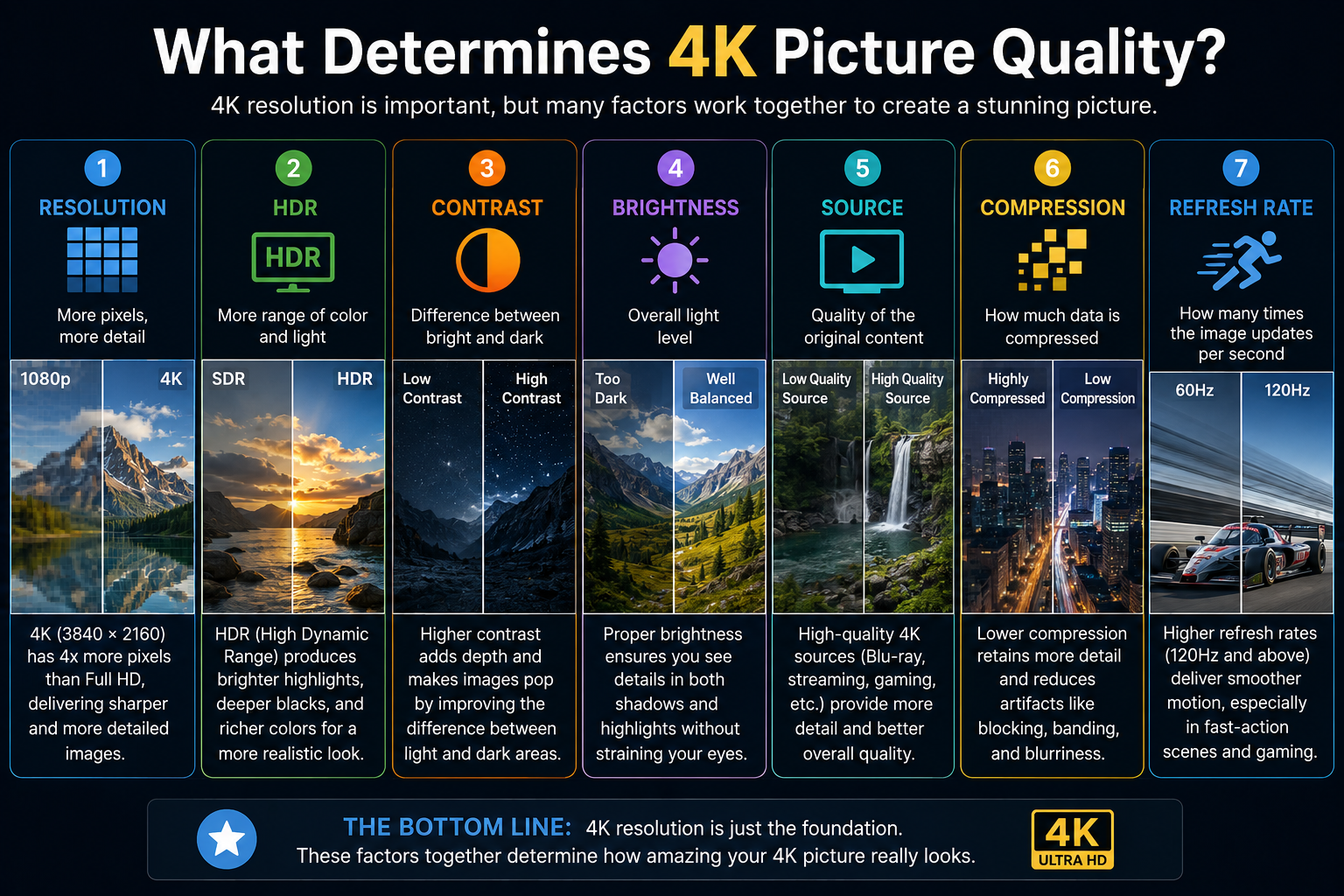
This is one of the most important concepts to understand.
A 4K label does not guarantee a particular level of picture quality.
Several factors work together.
1. Resolution
More pixels can represent more fine detail.
Moving from 1080p to 4K provides a substantial increase in pixel count, especially useful on larger displays or at closer viewing distances.
2. Screen Size
The same resolution can produce a different viewing experience depending on physical screen size.
A 4K image on a large television can provide a different perceived benefit from the same resolution on a much smaller display.
3. Viewing Distance
If you sit far enough away, your eyes may not be able to resolve all of the additional detail provided by a higher resolution.
This is why screen size and viewing distance should be considered together.
4. Source Quality
A 4K display cannot recover information that was never present in the source.
A high-quality native 4K video contains different information from a heavily compressed low-resolution video that has simply been scaled to a 4K display.
5. Compression
Two videos can both be labeled 4K while looking different because they may use different bitrates, codecs, compression levels or source material.
More pixels do not automatically mean more useful visual information.
6. HDR
HDR, or High Dynamic Range, is separate from resolution.
4K describes the pixel dimensions of an image. HDR concerns how compatible content and hardware handle brightness and color information.
A display can be 4K without being HDR, and HDR does not turn a lower-resolution image into 4K.
7. Contrast
Contrast affects how effectively a display separates bright and dark parts of an image.
Two displays with the same 3840 × 2160 resolution can therefore produce noticeably different images.
8. Brightness
Brightness is particularly relevant for HDR performance and for viewing a display in a bright room.
9. Color
Color accuracy, color gamut, processing and calibration can all affect the final image.
10. Refresh Rate
Refresh rate describes how frequently a display can update the image.
For example:
- 60 Hz can refresh up to 60 times per second
- 120 Hz can refresh up to 120 times per second
Higher refresh rates can make motion appear smoother, especially during gaming.
11. Image Processing
Modern displays can process incoming images in different ways.
Upscaling, noise reduction, sharpening, motion processing and other techniques can affect the final result.
Native 4K vs Upscaled 4K
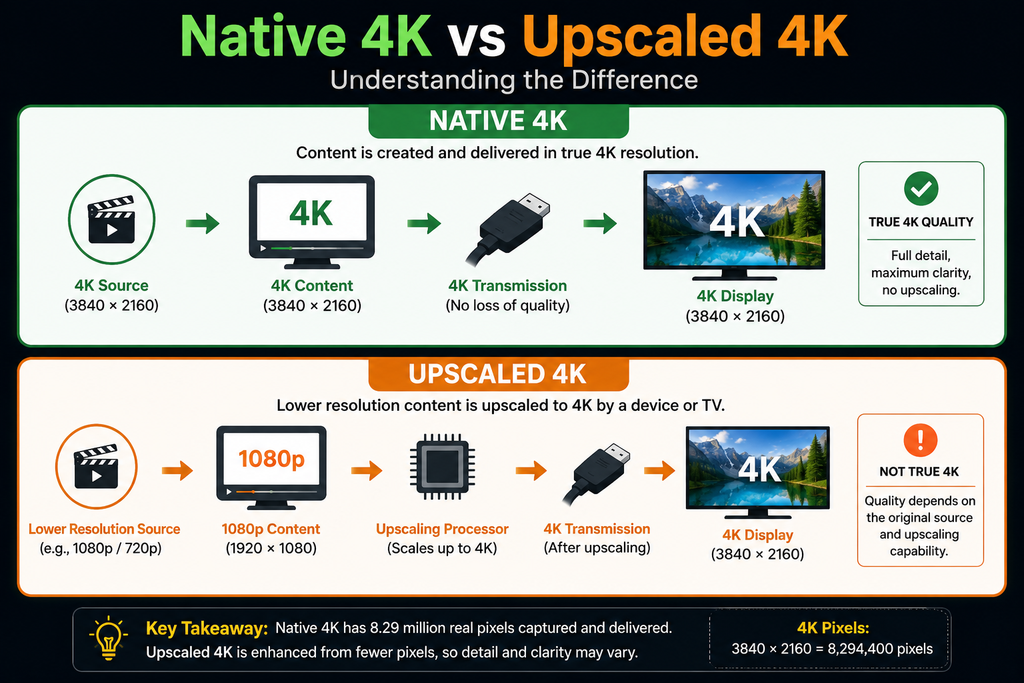
The phrase “4K” can describe the output resolution without necessarily describing the original resolution of the source.
What Is Native 4K?
Native 4K generally means that the source was created, captured or rendered at a genuine 4K-level resolution.
For consumer UHD, that commonly means 3840 × 2160.
What Is Upscaled 4K?
Upscaling takes lower-resolution content and processes it so that it can be displayed at a higher output resolution.
For example:
1920 × 1080 source → processing → 3840 × 2160 output
The display is receiving or producing a 4K-resolution output, but the original source was 1080p.
Good upscaling can produce a convincing image, but it does not create all of the original detail that would have existed in a native 4K source.
Why Upscaling Quality Matters
Different TVs, consoles, computers and media devices use different processing methods.
As a result, two devices can upscale the same lower-resolution source differently.
The important distinction is:
4K output does not automatically mean native 4K source material.
4K Viewing Distance and Screen Size
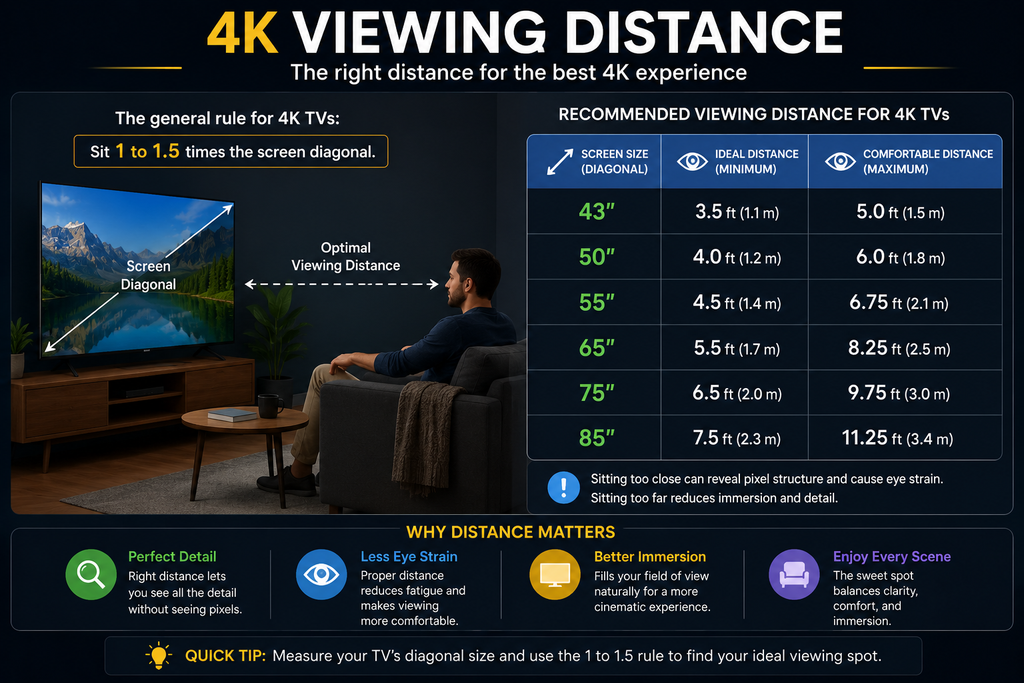
There is no single viewing distance that is perfect for every person and every 4K display.
The useful relationship depends on:
- screen size
- viewing distance
- visual acuity
- content quality
- screen resolution
- room layout
- personal preference
Why screen size matters
A larger screen occupies more of your field of view at the same distance.
That can make additional resolution easier to appreciate.
For example, the difference between 1080p and 4K may be easier to notice on a large television viewed from a reasonable distance than on a small screen viewed from far away.
Why distance matters
As you move farther from a display, small differences in pixel structure become harder for your eyes to distinguish.
This doesn’t mean that 4K becomes “useless” at a distance. It means that the visible advantage over a lower resolution can become less dramatic.
The practical rule
Don’t choose a resolution in isolation.
Think about:
screen size + viewing distance + content + eyesight + personal preference
together.
4K TVs
4K is now a standard resolution for many modern televisions.
A typical 4K UHD TV uses a 3840 × 2160 pixel grid, but resolution is only one specification to consider.
Other important characteristics can include:
- HDR support
- brightness
- contrast
- local dimming
- panel technology
- refresh rate
- motion performance
- color performance
- image processing
- upscaling
- gaming features
- HDMI capabilities
Two televisions can both be 4K and still provide substantially different viewing experiences.
Is a 4K TV Worth It?
For many buyers, 4K is a sensible choice, particularly when purchasing a medium or large modern television.
The benefit is more likely to be noticeable when:
- the screen is relatively large
- you sit close enough to resolve additional detail
- you watch high-quality 4K content
- you play games that support high-resolution output
- you use the TV as a large computer display
The benefit may be less dramatic when most content is low resolution or heavily compressed and viewed from a considerable distance.
The key point is:
Don’t buy a television because the box says “4K” alone.
Consider the complete display and your actual viewing environment.
4K Gaming Explained
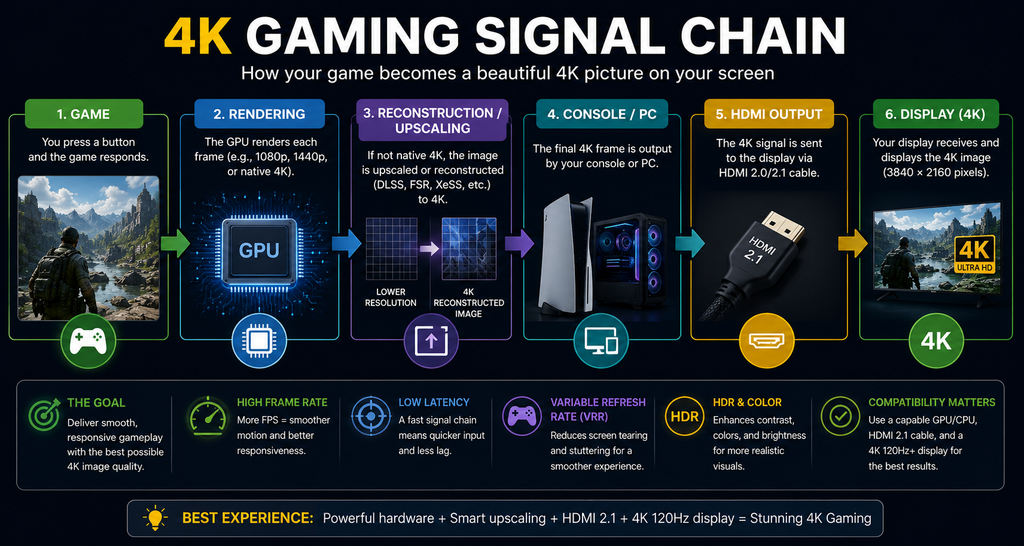
Gaming adds several specifications that are less important for ordinary video playback.
A 4K gaming setup can involve:
- output resolution
- internal rendering resolution
- frame rate
- refresh rate
- VRR
- input latency
- HDR
- GPU or console performance
- HDMI bandwidth
- upscaling
- reconstruction techniques
Output Resolution vs Internal Rendering Resolution
A game can output a 3840 × 2160 signal without rendering every frame internally at 3840 × 2160.
A system may use a lower internal rendering resolution and then use upscaling or reconstruction to produce the final output.
This distinction matters because:
4K output ≠ necessarily native 4K rendering.
4K at 60 Hz vs 120 Hz
Resolution and refresh rate are separate specifications.
A display might support:
4K at 60 Hz
or:
4K at 120 Hz
depending on the display, source device and connection.
A 120 Hz display does not automatically make a game run at 120 frames per second.
The gaming hardware and the game itself must also be capable of delivering the required frame rate.
VRR
Variable Refresh Rate technology can allow a compatible display to adjust its refresh behavior to better match changing frame rates.
This can be particularly useful in gaming.
Is Native 4K Gaming Necessary?
Not always.
Modern gaming systems use different rendering and reconstruction techniques to balance:
image quality ↔ performance ↔ frame rate
For many gamers, a well-implemented reconstruction technique at a high frame rate can be preferable to insisting on native 4K rendering at the expense of performance.
4K Streaming
4K streaming involves more than simply having a 4K television.
The quality of a stream can depend on:
- source quality
- bitrate
- compression
- codec
- streaming service
- available bandwidth
- network stability
- playback device
- display capabilities
- HDR support
This is why two pieces of content labeled “4K” can look noticeably different.
Why Can 4K Streaming Look Bad?
If a supposedly 4K stream looks soft, blocky or unstable, possible causes include:
- Heavy video compression
- Network congestion
- Unstable Wi-Fi
- Insufficient available bandwidth
- Device limitations
- Service-specific quality settings
- Lower-quality source material
- Incorrect playback or display settings
Your internet connection is important, but raw advertised download speed is not the only factor.
The actual streaming experience also depends on the service, device, network conditions and video delivery system.
For exact bandwidth requirements, check the current requirements published by the streaming service you use.
4K Monitors
4K monitors are commonly used for:
- office work
- programming
- photography
- graphic design
- video editing
- gaming
- general desktop use
One major advantage is pixel density.
At an appropriate screen size, 4K can make text, interfaces and detailed images appear very sharp.
Is a 4K Monitor Good for Work?
It can be particularly useful when you regularly work with:
- large spreadsheets
- detailed photographs
- video timelines
- multiple windows
- design applications
- text-heavy documents
However, higher pixel density can make interface elements physically smaller.
Operating-system scaling can therefore be important.
The best monitor size depends on how much physical workspace you want and how close you normally sit to the screen.
What Do You Need for 4K?
A complete 4K setup requires more than a 4K display.
For TV and Video
You may need:
- 4K-capable display
- 4K-capable source
- compatible connection
- appropriate cable
- compatible content
- HDR support if desired
- adequate streaming connection
For Gaming
Consider:
- 4K-capable display
- console or GPU capable of the desired output
- suitable refresh rate
- VRR if desired
- appropriate HDMI capability
- compatible game
- sufficient graphics performance
- suitable cable
For PC
Consider:
- GPU/output capability
- 4K monitor
- compatible DisplayPort or HDMI connection
- desired refresh rate
- operating-system scaling
- application requirements
The exact requirements depend on the signal you want.
For example, 4K at 60 Hz has different requirements from 4K at 120 Hz with HDR.
4K HDMI and Connectivity
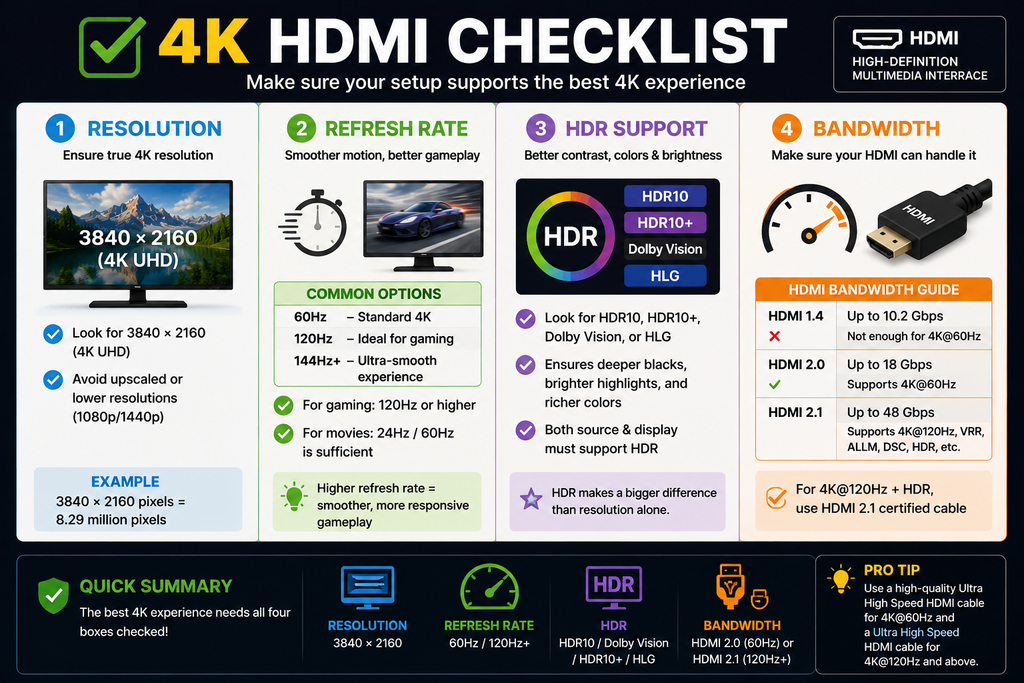
One of the most common mistakes is treating “4K” as though it completely describes a video signal.
It doesn’t.
A signal can involve several variables, including:
- resolution
- refresh rate
- HDR
- color format
- color depth
- bandwidth
That means the equipment required for one 4K configuration may not be sufficient for another.
Why Can 4K Work at 60 Hz but Not 120 Hz?
If 4K works at one refresh rate but not another, the limitation may be related to the capabilities of:
- the source device
- the display
- the HDMI port
- the cable
- the selected video settings
Check the capabilities of the complete signal chain rather than looking only at the words “4K compatible.”
Do You Need an Expensive HDMI Cable?
Not simply because you have a 4K display.
The appropriate cable depends on the signal you want to carry and the capabilities of the connected equipment.
The useful approach is to match the cable and connection to the required bandwidth rather than buying based solely on marketing language.
How to Choose a 4K Display
Start with your use case, not the resolution label.
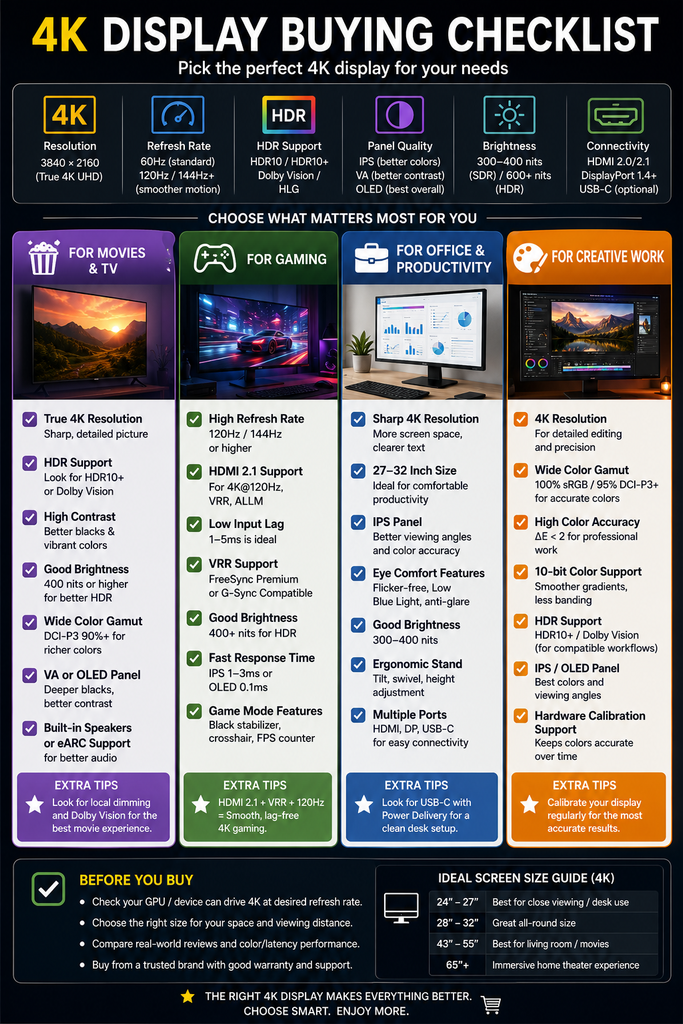
For Movies and TV
Prioritize:
- Screen size
- Contrast
- HDR performance
- Brightness
- Color performance
- Viewing environment
- Viewing distance
- Processing quality
For Gaming
Prioritize:
- Required resolution
- Refresh rate
- VRR
- Input latency
- HDR
- HDMI capabilities
- GPU/console performance
For Office Work
Prioritize:
- Screen size
- Pixel density
- Text clarity
- Ergonomics
- Connectivity
- Scaling
- Workspace requirements
For Photo and Video Work
Prioritize:
- Resolution
- Color accuracy
- Color gamut
- Bit depth
- Calibration
- HDR capabilities where relevant
- Panel characteristics
The important lesson
The best 4K display is not necessarily the one with the longest specification sheet.
It is the one whose characteristics match what you actually do with it.
4K Setup Troubleshooting Checklist
If you have a 4K display but aren’t getting the expected result, work through the signal chain.
Step 1: Check the source
Is the source device actually capable of producing the resolution and refresh rate you want?
Step 2: Check the content
Is the movie, game, stream or image actually available at 4K?
Step 3: Check the display
Does the display support the desired resolution, refresh rate and HDR configuration?
Step 4: Check the port
Make sure you are using a port capable of the desired signal.
Step 5: Check the cable
Verify that the cable is appropriate for the bandwidth required by your configuration.
Step 6: Check device settings
Look at the output resolution, refresh rate, HDR and other relevant settings.
Step 7: Check the entire signal chain
Remember:
Source → cable → port → display → settings → content
A limitation anywhere in that chain can affect the final result.
Common 4K Misconceptions
“4K means exactly 4,000 pixels wide.”
Not necessarily.
Consumer 4K UHD is commonly 3840 × 2160, while DCI 4K uses 4096 × 2160.
“4K is four times sharper than 1080p.”
4K UHD has four times the total number of pixels as 1080p.
That does not mean every image will appear four times sharper.
“Every 4K video is native 4K.”
No.
Some content is produced natively at 4K, while other content may be upscaled or reconstructed.
“A 4K TV automatically makes everything native 4K.”
No.
A 4K TV can upscale lower-resolution content, but the original source remains lower resolution.
“4K automatically means HDR.”
No.
4K describes resolution. HDR describes different image characteristics involving brightness and color.
“A more expensive HDMI cable automatically gives better 4K.”
Not necessarily.
The cable should be appropriate for the requirements of the signal and equipment.
4K: The Important Numbers
For quick reference:
3840 × 2160
Common consumer 4K UHD resolution.
8,294,400
Total pixels in a 3840 × 2160 image.
8.3 million
Approximate number of pixels in 4K UHD.
4×
Approximate total pixel count of 4K UHD compared with 1080p.
2160p
Another way of describing the vertical resolution of 4K UHD.
16:9
Common aspect ratio for consumer 4K television content.
Remember:
These numbers describe resolution—not the complete quality of the image.
Frequently Asked Questions About 4K
Is 4K the same as UHD?
In consumer electronics, the terms are often used interchangeably. 4K UHD normally means 3840 × 2160, while DCI 4K uses 4096 × 2160.
Is 4K better than 1080p?
4K has four times the total pixel count of 1080p and can reproduce more detail. How noticeable the difference is depends on screen size, viewing distance, source quality and display characteristics.
Is 1440p better than 4K?
4K has substantially more pixels than 1440p. Whether that difference is important depends on the display, viewing distance, content and hardware.
Is 8K better than 4K?
8K has four times the total pixel count of 4K UHD. But the practical benefit depends heavily on screen size, viewing distance, content and the viewer’s ability to resolve the additional detail.
Can you see the difference between 1080p and 4K?
Often, yes. The difference is more likely to be noticeable on larger displays and at viewing distances where your eyes can resolve the additional detail.
Does 4K mean HDR?
No. 4K describes resolution. HDR describes different brightness and color capabilities.
Can a 4K TV play 1080p content?
Yes. A 4K TV can generally accept lower-resolution content and scale it to its native display resolution.
Does 4K require special internet?
4K streaming requires sufficient network capacity and a compatible service/device setup, but there is no single universal speed requirement for every 4K stream. Requirements vary by service and delivery conditions.
Is 4K important for gaming?
It can be, especially on larger displays, but gaming also requires consideration of frame rate, refresh rate, VRR, input latency, graphics performance and connection capabilities.
Do you need 120 Hz for 4K?
No. 4K and refresh rate are separate specifications. A 4K display can operate at 60 Hz or other refresh rates depending on its capabilities.
Final Verdict: What Does 4K Really Mean?
4K is primarily a resolution specification.
For most consumer electronics, 4K UHD means:
3840 × 2160 pixels
That’s approximately 8.3 million pixels, or four times the total pixel count of 1080p.
That additional resolution can provide more visible detail, particularly on larger displays, at appropriate viewing distances and with good-quality source material.
But a 4K label doesn’t tell you everything you need to know.
The actual viewing experience also depends on:
- screen size
- viewing distance
- source quality
- compression
- HDR
- contrast
- brightness
- color
- refresh rate
- image processing
- upscaling
- gaming hardware
- connection capabilities
So instead of asking only:
“Is it 4K?”
ask:
“What resolution is the source, what can the display actually do, what connection is being used, and will I be able to see a meaningful benefit in my setup?”
That is the more useful way to understand 4K.