
Quick answer: For most people, yes. A 4K TV is worth it if you want a screen of about 50 inches or more, sit reasonably close, or use 4K streaming, a games console or 4K discs. A 1080p TV is still a sensible choice for small screens (around 32 inches or less), secondary rooms and tight budgets. The “4K” label matters less than screen size, seat distance and what you actually watch.
What the 4K vs 1080p Difference Really Is
A 1080p (Full HD) screen has 1920 × 1080 pixels, which is 2,073,600 in total. A 4K UHD screen has 3840 × 2160 pixels, or 8,294,400. That is exactly four times as many, and it means a 4K screen can show the same picture with finer detail, smoother edges and sharper text. For a fuller explanation of the format, read 4K resolution explained.
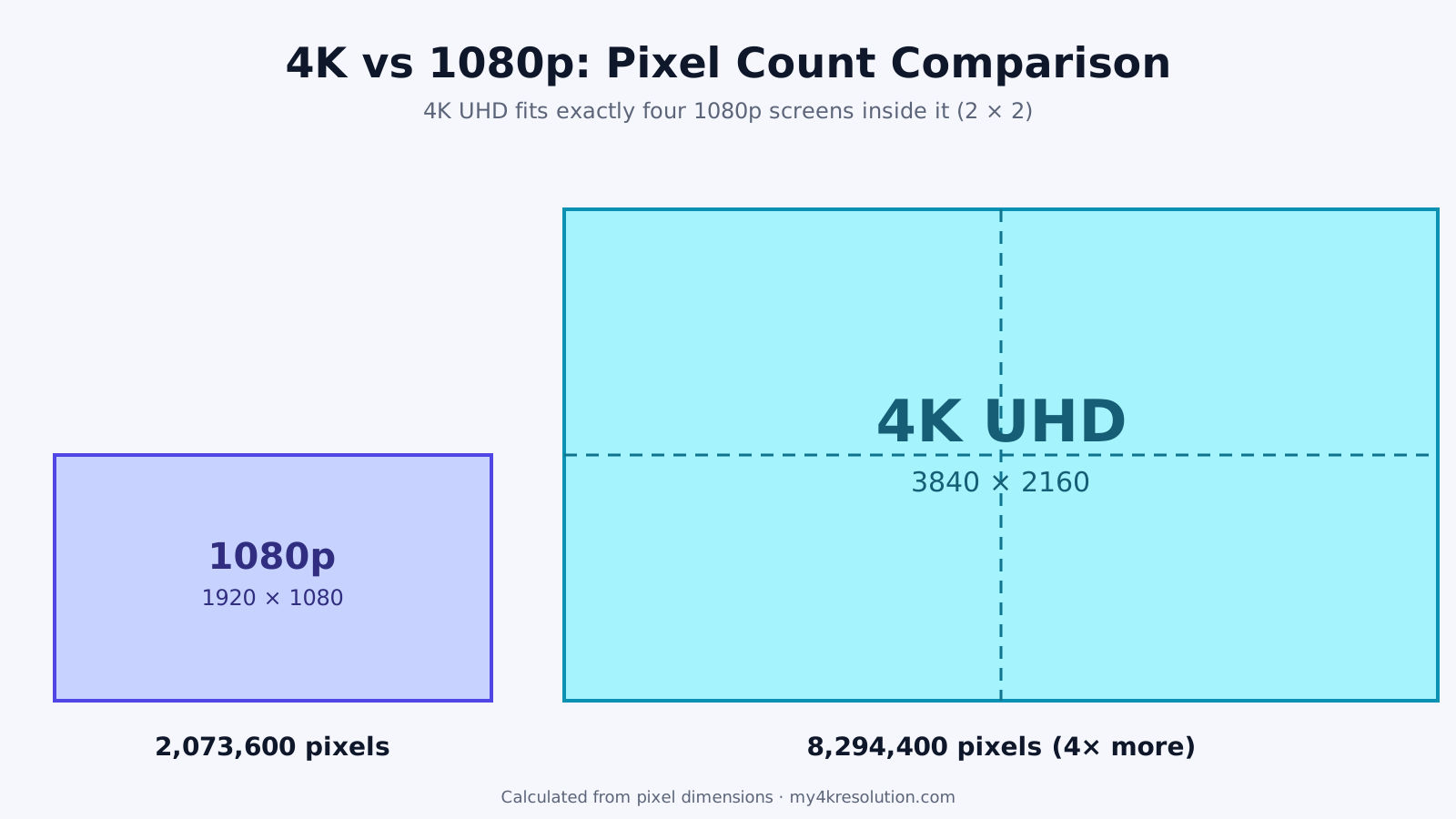
That four-times figure describes the panel, not the picture you will see. How much of it reaches your eyes depends on the three things below.
Screen Size and Seat Distance Decide the Benefit
The larger the screen, and the closer you sit, the easier it is to spot the pixel structure of a 1080p panel. Using the one-arcminute approximation for 20/20 vision, individual 1080p pixels start to disappear beyond roughly 1.5 times the screen diagonal. Sit closer than that and 4K can show a visible sharpness gain.
| TV size | 1080p pixels become hard to see beyond | Verdict |
|---|---|---|
| 32 in | about 4.2 ft / 1.3 m | 1080p is usually fine unless you sit very close |
| 43 in | about 5.6 ft / 1.7 m | 4K helps at desk or close-sofa distance |
| 55 in | about 7.2 ft / 2.2 m | 4K helps at typical living-room distances |
| 65 in | about 8.5 ft / 2.6 m | 4K is clearly worthwhile |
| 75 in | about 9.8 ft / 3.0 m | 4K is clearly worthwhile |
These are calculated figures, not lab measurements, and eyesight varies. Our 4K TV size and viewing distance guide explains the math and has a calculator for your own room.
Will Your Content Use the Extra Pixels?
A TV can only show detail that exists in the source. Check what you actually watch:
- 4K streaming. Several major services offer 4K titles, often on a higher-priced plan, and they need a stable connection. Their published recommendations tend to fall in the mid-teens to mid-twenties of Mbps, but check your provider’s current guidance. See how much internet speed 4K streaming needs.
- 4K discs. Ultra HD Blu-ray typically carries much higher bitrates than streaming, so it usually preserves more fine detail. You need a 4K-capable player.
- Games. Current consoles and gaming PCs can output 4K, and many games use upscaling to reach it. The more demanding modes, such as 4K at 120 Hz, need HDMI 2.1. Read native vs upscaled 4K gaming.
- Broadcast TV, DVDs and older streams. These are mostly lower resolution. A 4K TV upscales them, and good processing can make them look clean, but upscaling cannot add detail that was never captured. See native vs upscaled 4K.
If nearly everything you watch is standard definition or low-bitrate video, a 4K panel will show less of an improvement. If you stream, game or watch discs, you will use it far more.
What Else Comes With a 4K TV
For many buyers, the practical reason to choose 4K is not the pixel count at all. Resolution and these features are separate specifications, but they tend to arrive together on 4K models:
- HDR support. HDR affects brightness and color range, and it is a distinct feature from resolution. Many current 4K TVs support formats such as HDR10, HLG or Dolby Vision, while many entry-level 1080p sets do not. How good the HDR looks varies widely by model, so check reviews and measurements rather than the logo.
- Modern smart platform and processing. Newer sets tend to have faster interfaces, better upscaling and longer software support.
- Gaming features. Variable refresh rate and 120 Hz input are generally found on newer 4K sets. Always confirm which HDMI ports support them.
- Availability. 4K is now the mainstream standard in mid-size and large TVs, so choosing 1080p can limit your options at those sizes.
When a 1080p TV Is the Better Choice
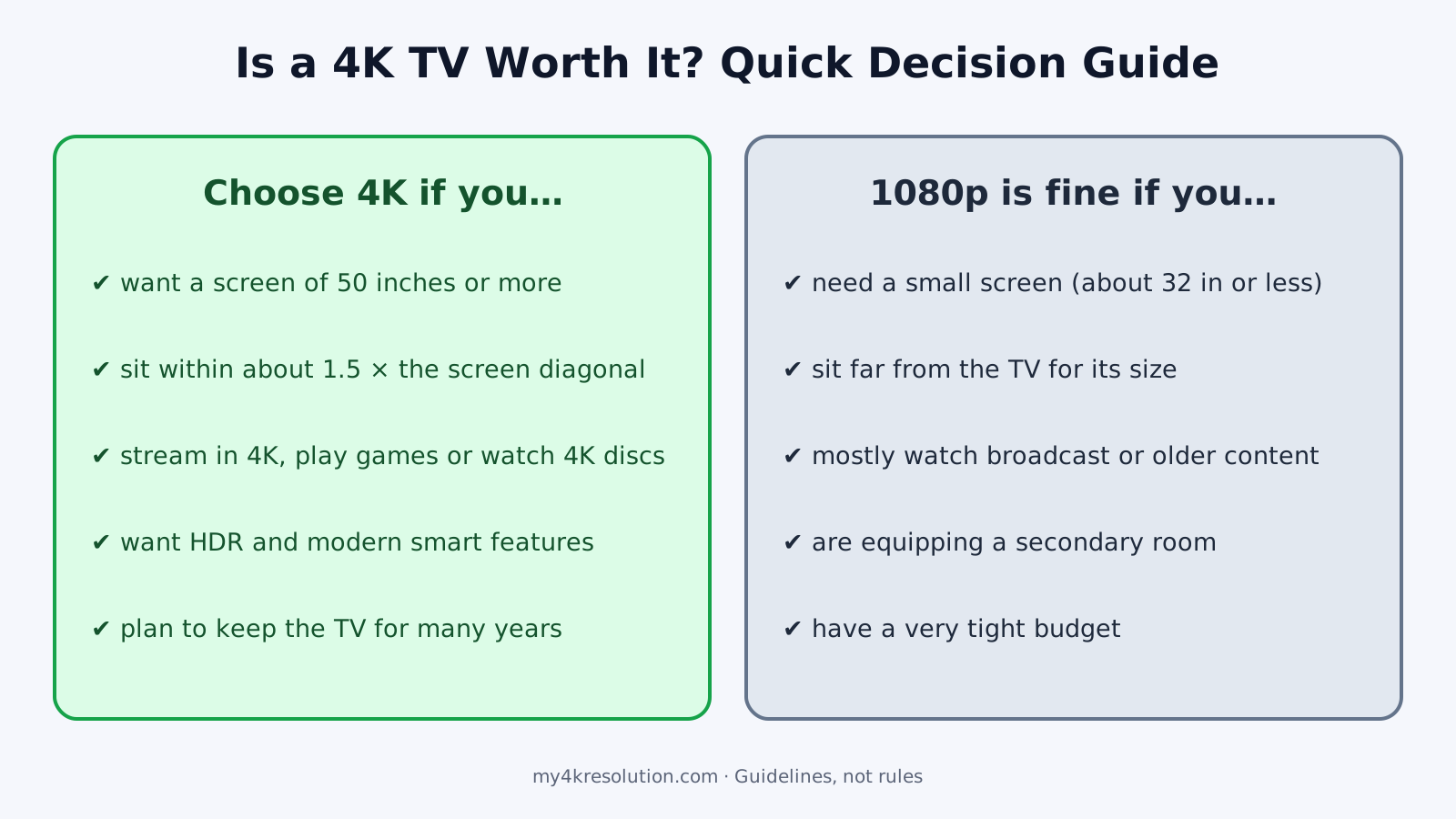
- The screen is small. At about 32 inches or less, and normal seat distance, the benefit is limited.
- It’s a secondary TV. Kitchens, guest rooms, kids’ rooms and workshops rarely need the extra detail.
- You sit far away. If you are well beyond 1.5 times the diagonal, pixel sharpness is hard to see.
- Your budget is tight. A good 1080p set can be a better buy than a poor 4K one.
- You watch mostly older content. If you rarely use 4K sources, the gain is smaller.
When 4K Is Clearly Worth It
- You want a TV of 50 inches or more.
- You sit close for the screen size, for example a 65-inch set at 7 to 8 feet.
- You stream in 4K, play games or watch 4K discs.
- You want HDR and modern smart features.
- You plan to keep the TV for many years, since content and devices keep moving to 4K.
A 60-Second Buying Checklist
- Measure your seat distance and pick a size with our distance guide.
- List what you watch. Streaming, games, discs or broadcast?
- Check the connections. If you game or use a soundbar, confirm HDMI 2.1 and eARC ports. See the HDMI cable guide.
- Compare picture quality, not just resolution. Read independent reviews for contrast, brightness and HDR.
- Check current prices. The 4K premium at many sizes is small, but prices change, so compare before buying.
Frequently Asked Questions
Is a 4K TV worth it over 1080p?
For 50 inches and above, or if you sit close, stream in 4K or game, yes. For small or secondary TVs, 1080p is often enough.
Can you really see the difference between 4K and 1080p?
Often yes on larger screens at normal seating distances. The difference shrinks on small screens, at long distances and with low-quality sources.
Does a 4K TV make 1080p content look better?
It upscales it to fit the panel. Good processing makes it look clean, but it cannot restore detail missing from the source.
Is 4K better than HDR?
They are different things. 4K is resolution; HDR is brightness and color range. Many viewers notice good HDR more than extra pixels, which is why TV quality matters beyond resolution.
Do I need a special HDMI cable for 4K?
It depends on the signal. 4K at 60 Hz needs more bandwidth than 1080p, and 4K at 120 Hz needs a certified Ultra High Speed cable and a compatible port.
Should I buy an 8K TV instead?
For most people, no. 8K content is scarce, and the visible gain over 4K is very hard to see at normal distances.
The Bottom Line
Choose the TV for your room and your content, not just the resolution. If you want 50 inches or more, sit within about 1.5 times the diagonal, or use 4K sources, buy 4K. If you need a small, simple or secondary screen, a good 1080p TV is perfectly sensible.
Keep reading: 4K resolution explained · 4K TV size and distance guide · Native vs upscaled 4K · Back to the 4K hub
Methodology and Limits
Pixel counts and viewing distances are calculated from screen geometry and the one-arcminute approximation of 20/20 acuity. We have not tested individual TV models for this article, and prices and streaming requirements change, so check current details before you buy.
