
Quick answer: 4K resolution on TVs and monitors usually means 3840 × 2160 pixels (called 4K UHD). That is 8,294,400 pixels, exactly four times the pixels of 1080p. Whether you can see the extra detail depends on screen size, viewing distance, source quality and the display itself, not on the “4K” label alone.
- What is 4K resolution?
- 4K UHD vs DCI 4K
- How many pixels does 4K have?
- 4K vs 1080p vs 1440p vs 8K
- Pixel density: why screen size changes everything
- What decides how good 4K looks
- Native 4K vs upscaled 4K
- Viewing distance
- 4K for TVs, monitors, gaming and streaming
- The 4K signal chain: HDMI and cables
- Common 4K myths
- FAQ
What Is 4K Resolution?
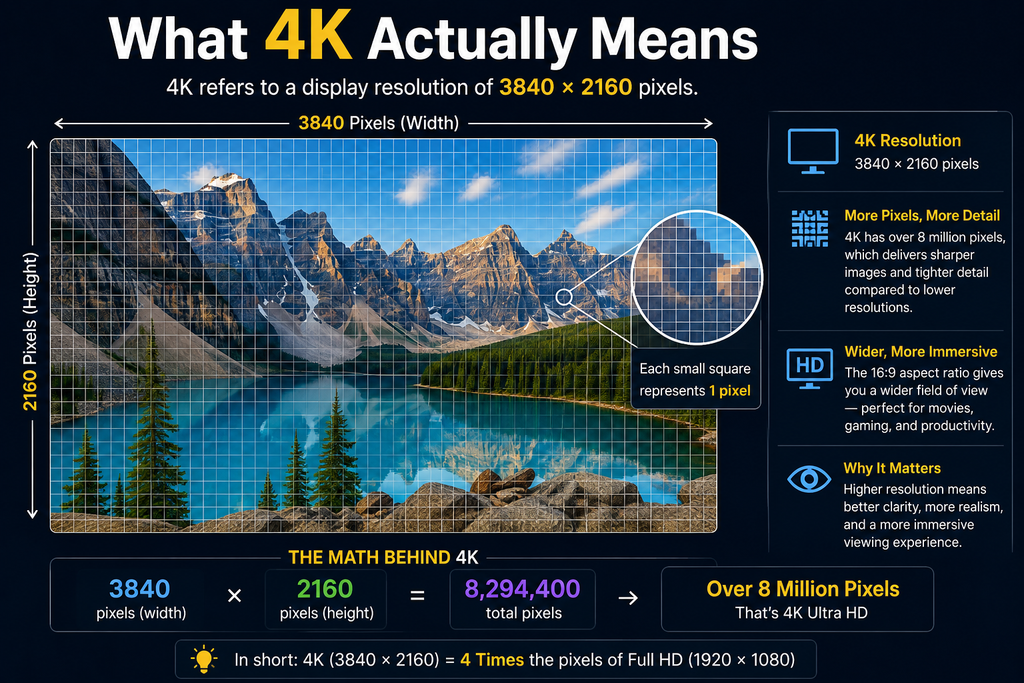
Resolution is the number of pixels a display or video file contains, written as width × height. “4K” gets its name from the roughly 4,000 pixels across the horizontal dimension. For consumer TVs, monitors and streaming, the figure you will meet almost every time is 3840 × 2160.
The same format is also called 2160p (the vertical pixel count, following the “1080p” naming style), UHD or Ultra HD. The Consumer Technology Association’s Ultra HD definition requires a minimum of 3840 × 2160 pixels, which is why UHD and consumer 4K are treated as the same thing in shops.
4K UHD vs DCI 4K
Two formats share the “4K” name:
| Format | Resolution | Aspect ratio | Where you’ll see it |
|---|---|---|---|
| 4K UHD | 3840 × 2160 | 16:9 (1.78:1) | TVs, monitors, streaming, consoles |
| DCI 4K | 4096 × 2160 | ≈1.9:1 | Digital cinema, professional production |
DCI 4K comes from the Digital Cinema Initiatives specification used by cinemas and film production. It is 256 pixels wider than UHD. Unless a product says otherwise, a 4K TV or monitor is 3840 × 2160.
How Many Pixels Does 4K Have?
The arithmetic is simple: 3840 × 2160 = 8,294,400 pixels, about 8.3 megapixels. DCI 4K has 4096 × 2160 = 8,847,360 pixels.
Each pixel is a tiny dot that the display lights in a particular color. More pixels give the screen more points to describe an image, but they do nothing about the quality of the image information fed to them. That distinction runs through everything below.
4K vs 1080p vs 1440p vs 8K
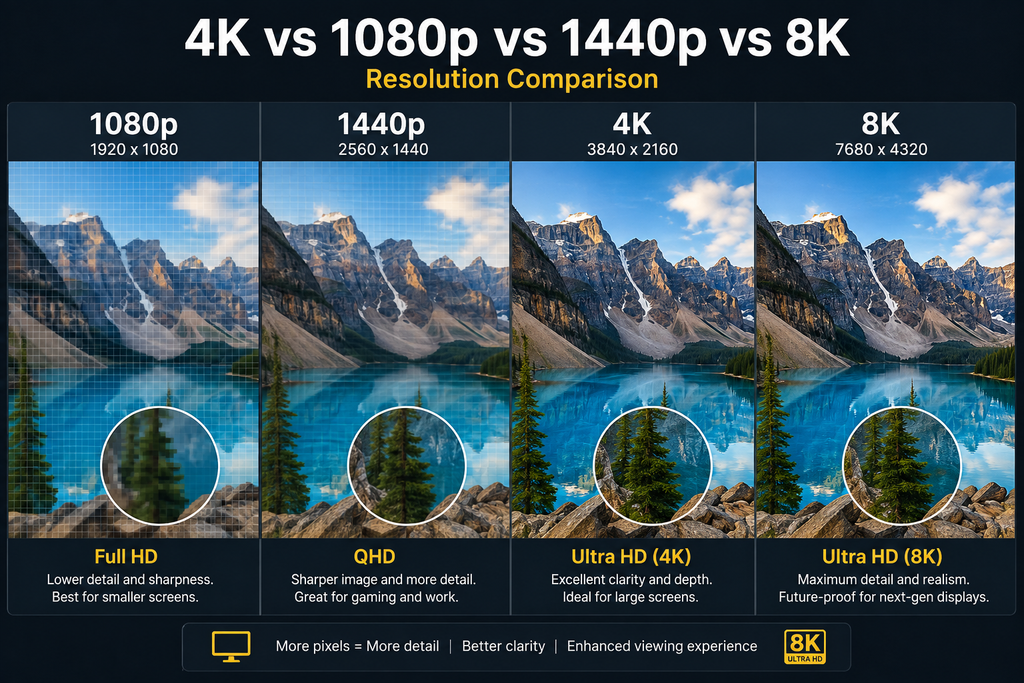
| Name | Resolution | Total pixels | Compared with 4K |
|---|---|---|---|
| 720p (HD) | 1280 × 720 | 921,600 | 9% of 4K |
| 1080p (Full HD) | 1920 × 1080 | 2,073,600 | 25% (¼) |
| 1440p (QHD) | 2560 × 1440 | 3,686,400 | 44% |
| 4K UHD | 3840 × 2160 | 8,294,400 | baseline |
| 8K UHD | 7680 × 4320 | 33,177,600 | 4× more |
Two points are worth remembering. First, 4K doubles both the width and the height of 1080p, which is why the total pixel count is four times higher, while each dimension is only twice as large. Second, 8K repeats that jump again. Quadrupling pixels each time means returns diminish quickly unless the screen is very large or you sit very close.
Pixel Density: Why Screen Size Changes Everything
Resolution alone is half the story. Pixel density (pixels per inch, PPI) is resolution spread over a physical size. A 4K picture stretched across a large TV looks different from the same 4K picture on a small monitor. Using the diagonal pixel count of 4K (about 4,406 pixels), the PPI of a 3840 × 2160 panel works out to:
| Screen size | 4K PPI (approx.) | 1080p PPI (approx.) |
|---|---|---|
| 27 in monitor | 163 | 82 |
| 32 in monitor | 138 | 69 |
| 43 in TV / monitor | 102 | 51 |
| 55 in TV | 80 | 40 |
| 65 in TV | 68 | 34 |
This is why 4K matters most on desk monitors, where you sit about an arm’s length away and text sharpness is obvious, and on large TVs where 1080p pixels become easier to spot. On a small screen viewed from far away, your eyes may be unable to resolve the difference.
What Decides How Good 4K Looks
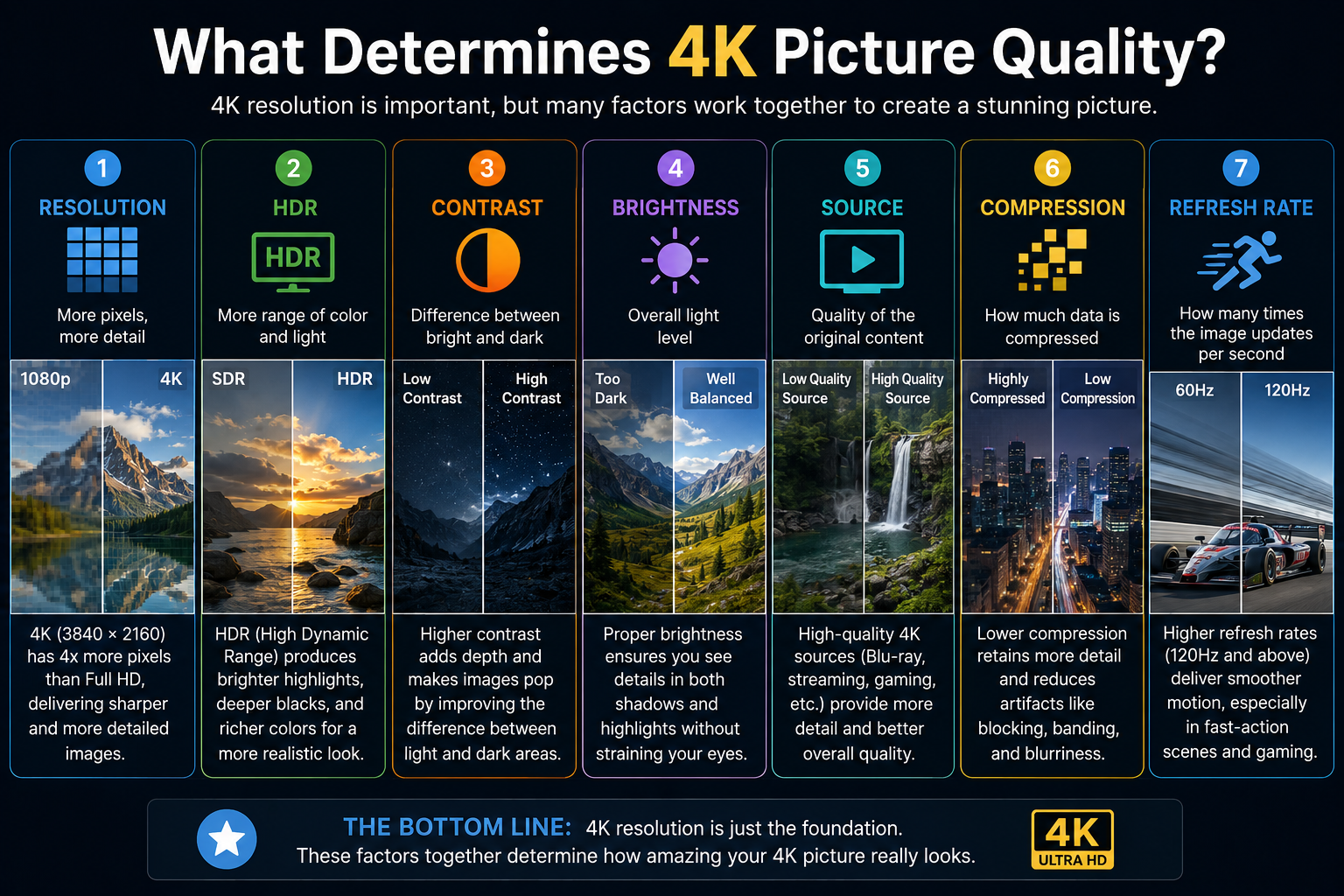
“4K” tells you the pixel grid and nothing else. These factors determine what you actually see:
- Source quality. A display cannot add detail that was never captured. A clean 4K camera original contains real fine detail; a soft 1080p video stretched to 4K does not.
- Compression and bitrate. Streaming services compress video heavily. A heavily compressed “4K” stream can show blocky shadows and smeared textures, while a higher-bitrate source, such as a 4K Blu-ray disc, preserves more.
- HDR. High Dynamic Range concerns brightness and color range, not pixels. It is a separate feature; a 4K display may or may not support it, and common formats include HDR10, HLG and Dolby Vision.
- Contrast and brightness. Black levels, local dimming and peak brightness often change the picture more than resolution does. Two 4K TVs can look very different side by side.
- Color. Color gamut, bit depth and calibration affect realism. Many 4K displays cover a wider gamut than older HD displays, but coverage varies by model.
- Refresh rate and motion handling. 60 Hz displays refresh 60 times per second; 120 Hz displays can refresh 120 times. This matters most for sport and gaming.
- Image processing. Upscaling, noise reduction and sharpening differ between brands and generations.
Native 4K vs Upscaled 4K
Native 4K means the content was captured, mastered or rendered at 3840 × 2160. Upscaled 4K means lower-resolution content (for example 1080p) has been processed to fill a 4K panel. A 4K TV does this automatically for older content, and good scalers produce clean, convincing results, but upscaling estimates missing detail rather than restoring it.
Games add a third case. Many consoles and PC games render internally below 3840 × 2160 and then use upscaling or reconstruction to output a 4K signal. So 4K output does not always mean native 4K rendering. For many players this is a sensible trade because it buys higher frame rates. We cover this in Native 4K vs Upscaled 4K Gaming.
Viewing Distance: Will You Actually See the Difference?
A person with 20/20 vision can typically resolve detail of around one arcminute, which is the basis of most “can you see the pixels?” calculations. Seat yourself far enough back and neighbouring pixels blend together, so extra resolution stops being visible. Industry guidance such as SMPTE and THX describes comfortable viewing in terms of how much of your field of view the screen fills (roughly 30° to 40° for home cinema), which means that bigger screens call for sitting farther back, and 4K lets you sit closer without seeing pixels.
4K for TVs, Monitors, Gaming and Streaming
4K TVs
4K is now standard on most mid-size and large TVs, so the real buying decision is contrast, HDR performance, brightness, motion handling and smart-platform quality. If you are weighing the upgrade, read Is a 4K TV worth it over 1080p?
4K monitors
At 27 to 32 inches, 4K gives noticeably sharper text and room for more windows. The trade-off is that interface elements appear small unless you use operating-system scaling. See the best 4K monitor size for work and 4K scaling on Windows and Mac.
4K gaming
Native 4K is demanding. Frame rate, VRR, input lag and HDMI bandwidth all matter as much as resolution. Compare 4K at 60 Hz vs 120 Hz.
4K streaming
Streaming quality depends on bitrate, codec, network stability and the service itself. Major services publish their own recommended speeds for 4K, which are generally in the mid-teens to mid-twenties of Mbps, but check your provider’s current guidance, since it changes. Read why 4K streaming looks bad and how much internet speed you need.
The 4K Signal Chain: HDMI, Cables and Ports
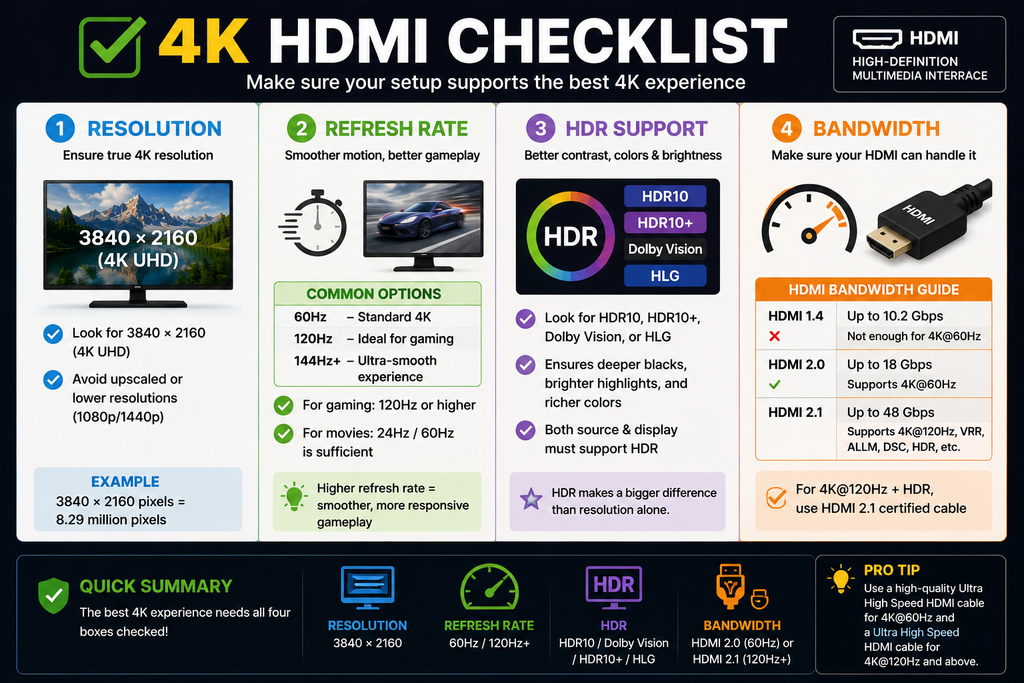
“4K” doesn’t fully define a video signal. Resolution, refresh rate, HDR, color format and bit depth together set how much bandwidth a connection must carry. Broadly:
| Signal | Typically needs |
|---|---|
| 4K at 24–30 Hz | HDMI 1.4 and up |
| 4K at 60 Hz (8-bit) | HDMI 2.0 (18 Gbps) and up |
| 4K at 60 Hz, 10-bit HDR, full color (4:4:4) | More than HDMI 2.0 can carry uncompressed; usually reduced color (4:2:2 or 4:2:0) or HDMI 2.1 |
| 4K at 120 Hz | HDMI 2.1 (48 Gbps) with a certified Ultra High Speed cable |
If 4K works at 60 Hz but not 120 Hz, check the whole chain: source device, cable, port on the TV (not every HDMI port on a TV supports the full spec), display settings and the content itself. Follow our 4K troubleshooting checklist and our HDMI cable guide.
Common 4K Myths
- “4K means exactly 4,000 pixels wide.” Consumer 4K is 3,840 wide; cinema 4K is 4,096.
- “4K is four times sharper than 1080p.” It has four times the pixels; perceived sharpness depends on size, distance and source.
- “Every 4K video is native 4K.” Some are upscaled or mastered from lower-resolution sources.
- “4K always includes HDR.” They are separate features.
- “Expensive HDMI cables make 4K look better.” A cable either carries the signal or doesn’t; match it to the bandwidth you need.
- “8K makes 4K obsolete.” 8K content is scarce, and the visible gain depends heavily on screen size and distance.
Frequently Asked Questions
What does 4K resolution mean?
It means an image about 4,000 pixels wide. For TVs and monitors it is 3840 × 2160, or 8,294,400 pixels.
Is 4K the same as UHD?
In shops, yes. Strictly, 4K UHD is 3840 × 2160 while DCI 4K is 4096 × 2160.
Is 4K better than 1080p?
It has four times the pixels and can show finer detail, but the visible gain depends on screen size, distance and content quality.
Is 1440p or 4K better?
4K has about 2.25 times as many pixels as 1440p. 1440p needs less graphics power, which many gamers prefer at high frame rates.
Does 4K need HDR?
No. HDR is a separate feature covering brightness and color.
Can a 4K TV play 1080p content?
Yes. It upscales the content to fit its panel, though it can’t restore detail missing from the source.
Do I need 120 Hz for 4K?
No. Many 4K displays run at 60 Hz. 120 Hz mainly benefits compatible games and some motion-heavy content.
How fast must my internet be for 4K streaming?
It varies by service. Check your provider’s published recommendation, and remember Wi-Fi stability matters as much as headline speed.
The Bottom Line
4K is a resolution: 3840 × 2160 pixels, 8.3 million in total. It gives you more potential detail, but you only benefit when the screen size, viewing distance, source quality and connection all support it. Instead of asking “is it 4K?”, ask: what is the source resolution, what can my display really do, how is it connected, and will I see a difference where I sit?
Keep reading: Native vs upscaled 4K · 4K TV size and distance guide · 4K not working? Fix it · Back to the 4K hub
Sources and Standards Referenced
Resolution figures are calculated from pixel dimensions. Format definitions follow the Consumer Technology Association (Ultra HD), Digital Cinema Initiatives (DCI 4K), ITU-R recommendations for UHDTV, and HDMI Licensing Administrator specifications (hdmi.org). Streaming figures vary by provider and change over time; check each service’s current help page.
