
Quick answer: Sit about 1.2 to 1.6 times the TV’s diagonal away from a 4K TV. That puts a 65-inch TV about 6.5 to 8.8 feet (2.0 to 2.7 m) from your eyes. Closer than that, 4K lets you see more detail without visible pixels. Much farther, and you start to lose the benefit of both the size and the resolution.
- Why distance and size matter more than the “4K” label
- 4K TV viewing distance chart (43–85 inches)
- Free calculator: find your size or distance
- The 1-arcminute rule and pixels per degree
- At what distance does 4K stop beating 1080p?
- Choosing a size by room distance
- Other things that change the answer
- Common mistakes
- FAQ
Why Distance and Size Matter More Than the “4K” Label
A 4K TV has 3840 × 2160 pixels whatever its size. What changes between a 43-inch and an 85-inch set is how big each pixel is. Your eyes, however, don’t care about the pixel count on the box. They respond to how large each pixel looks from where you sit. That single idea explains almost every recommendation in this guide. If you’re new to the basics, start with our 4K resolution explainer.
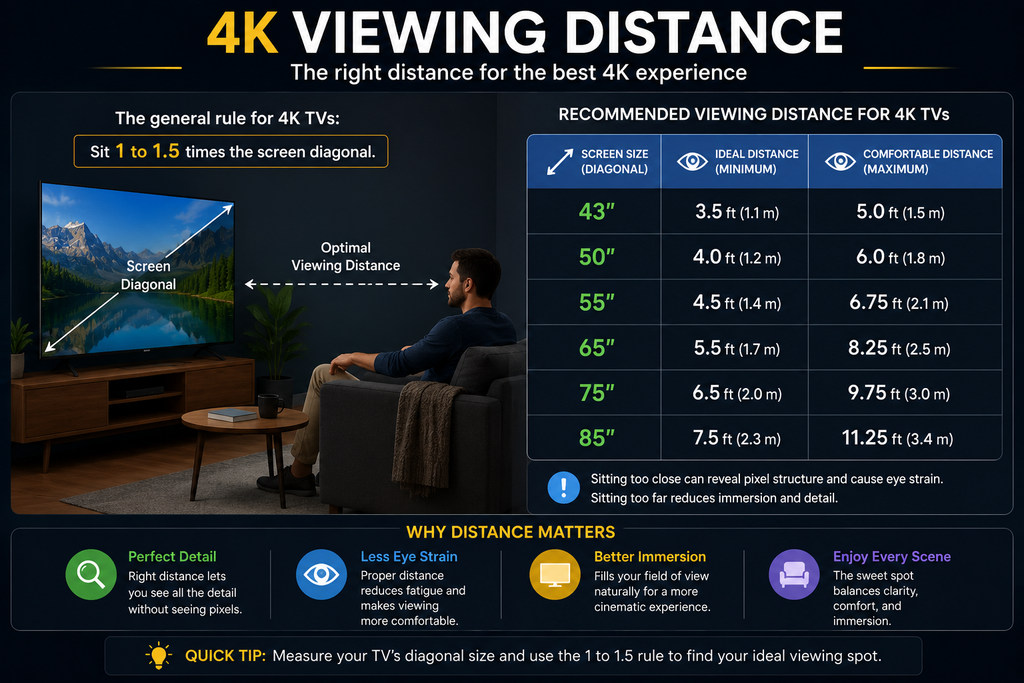
4K TV Viewing Distance Chart (43–85 Inches)
Two industry-style guidelines describe how much of your field of view a screen should fill. A 30° horizontal viewing angle is a relaxed, comfortable guideline (associated with SMPTE guidance), and about 40° is the more immersive cinema-style guideline (associated with THX). Using simple geometry for a 16:9 screen, the distances work out like this:
| TV size | Immersive (≈40°) | Comfortable (≈30°) |
|---|---|---|
| 43 in | 4.3 ft / 1.3 m | 5.8 ft / 1.8 m |
| 50 in | 5.0 ft / 1.5 m | 6.8 ft / 2.1 m |
| 55 in | 5.5 ft / 1.7 m | 7.5 ft / 2.3 m |
| 65 in | 6.5 ft / 2.0 m | 8.8 ft / 2.7 m |
| 75 in | 7.5 ft / 2.3 m | 10.2 ft / 3.1 m |
| 85 in | 8.5 ft / 2.6 m | 11.5 ft / 3.5 m |
How we calculated this: a 16:9 screen’s width is 0.8716 × its diagonal. For a viewing angle θ, distance = (width ÷ 2) ÷ tan(θ ÷ 2). That gives roughly 1.2 × diagonal for 40° and 1.6 × diagonal for 30°. Figures are rounded and assume you sit centered. They are guidelines, not rules.
Free Calculator: Find Your Size or Distance
4K TV Distance Calculator
The 1-Arcminute Rule and Pixels per Degree
A person with 20/20 vision can distinguish detail of about one arcminute, which is 1/60 of a degree. That means your eye can, in principle, separate about 60 pixels per degree of your field of view. If a screen delivers more than about 60 pixels per degree, you generally can’t make out individual pixels. If it delivers fewer, you can.
This yields a size-independent way to compare resolutions. A screen filling 30° of your view from edge to edge gives roughly:
| Resolution | Pixels per degree at 30° | At 40° | Vs. 60 PPD target |
|---|---|---|---|
| 1080p (1920 px wide) | ≈64 | ≈48 | Borderline at 30°; pixels can show at 40° |
| 4K (3840 px wide) | ≈128 | ≈96 | Comfortably above at both angles |
In other words, at the immersive 40° angle a 1080p screen sits below the limit of 20/20 vision while a 4K screen stays well above it. That is the real case for 4K on a big TV in a normal room.
At What Distance Does 4K Stop Beating 1080p?
Using the same rule, individual 4K pixels become indistinguishable beyond about 0.78 × the diagonal, and 1080p pixels beyond about 1.56 × the diagonal. If you sit farther than the 1080p figure, a 20/20 viewer would struggle to see any resolution advantage from 4K.
| TV size | 1080p pixels vanish beyond | 4K pixels vanish beyond |
|---|---|---|
| 43 in | 5.6 ft / 1.7 m | 2.8 ft / 0.9 m |
| 50 in | 6.5 ft / 2.0 m | 3.3 ft / 1.0 m |
| 55 in | 7.2 ft / 2.2 m | 3.6 ft / 1.1 m |
| 65 in | 8.5 ft / 2.6 m | 4.2 ft / 1.3 m |
| 75 in | 9.8 ft / 3.0 m | 4.9 ft / 1.5 m |
| 85 in | 11.1 ft / 3.4 m | 5.5 ft / 1.7 m |
What this tells you: if your sofa is closer to the TV than the 1080p column, 4K can show a visible sharpness gain. If you sit well beyond it, the pixel-sharpness gain shrinks. Note, however, that 4K TVs often bring other upgrades, such as better HDR hardware and processing, and those benefits don’t depend on distance. See Is a 4K TV worth it over 1080p? for the full picture.
Choosing a TV Size by Room Distance
If you already know where the sofa will sit, work backwards. Measure from the screen to your eyes with a tape measure, then use this table (same 40° and 30° guidelines):
| Seat distance | Suggested 4K TV size |
|---|---|
| 5 ft / 1.5 m | 37–50 in |
| 6 ft / 1.8 m | 44–60 in |
| 7 ft / 2.1 m | 52–70 in |
| 8 ft / 2.4 m | 59–80 in |
| 10 ft / 3.0 m | 74–100 in |
| 12 ft / 3.7 m | 89–120 in |
Most people choose within the upper half of their range if they mainly watch films and the lower half if the TV also serves for casual viewing, gaming at close range or a bright room. Preference matters: some viewers find a 40° screen overwhelming for sport or fast action.
Other Things That Change the Answer
- Content type. Native 4K films and games reveal resolution better than low-bitrate TV or heavily compressed streaming. Read native vs upscaled 4K and why 4K streaming can look soft.
- Room lighting. In a bright room, brightness and anti-reflection performance often matter more than resolution.
- Off-axis seating. If people sit at wide angles, panel type affects how contrast and color hold up. This is a panel matter, not a resolution one.
- Gaming at close range. Sitting nearer increases the field of view and the visibility of pixels and scaling artifacts. Check native vs upscaled gaming and 4K at 60 vs 120 Hz.
- Your eyesight. Glasses, contacts and age all change how much detail you resolve.
- Your connection. A large 4K screen is only as good as the signal it receives. If something looks wrong, run through our 4K troubleshooting checklist.
Common Mistakes
- Buying by the box instead of the room. Measure your seat distance first.
- Going too small. A 43-inch TV 9 feet away fills little of your view, so you lose the benefit of both size and resolution.
- Ignoring the wall or stand. Check width, depth and stand feet before buying a large TV.
- Treating distance rules as law. They are starting points. If you can, view the TV in a shop at a similar distance.
- Forgetting HDMI needs. A big 4K TV used for gaming may need the right port and cable. See the HDMI cable guide.
Frequently Asked Questions
How far should I sit from a 65-inch 4K TV?
About 6.5 to 8.8 feet (2.0 to 2.7 m). Nearer the low end is more immersive; nearer the high end is more relaxed.
How far should I sit from a 55-inch 4K TV?
Roughly 5.5 to 7.5 feet (1.7 to 2.3 m).
Can you sit too close to a 4K TV?
You can, but 4K lets you sit closer than 1080p before pixels become visible. Too close means you must move your eyes and head to follow the picture, which many people find tiring.
Is a bigger TV always better?
No. It should suit your room and seat distance. An oversized TV in a small room can feel overwhelming and show source flaws.
Is 4K worth it if I sit far away?
The sharpness gain shrinks with distance, but 4K TVs also tend to bring HDR and processing improvements that remain useful regardless of how far you sit.
Is the viewing-distance formula the same for 8K?
The method is identical, but because 8K doubles the pixels across again, its pixels are indistinguishable at about half the 4K distance, which makes the benefit very hard to see in normal rooms.
The Bottom Line
Pick the TV size from your seat distance, not the other way round. For most living rooms, 1.2 to 1.6 times the diagonal is a dependable starting range, and 4K makes the closer end of that range look clean where 1080p would show pixels. Once the size is right, move on to contrast, HDR and the signal you feed it.
Keep reading: 4K resolution explained · Is a 4K TV worth it? · Back to the 4K hub
Methodology and Limits
All distances are calculated from screen geometry for 16:9 panels and the one-arcminute approximation of 20/20 visual acuity. The 30° and 40° viewing angles are widely cited industry guidelines associated with SMPTE and THX. We have not measured individual TV models for this article, and results vary by person, content and room.
