
Quick answer: For 4K at 60 Hz with HDR, buy a cable certified as Premium High Speed (18 Gbps) or better. For 4K at 120 Hz, buy a certified Ultra High Speed (48 Gbps) cable. Ignore version numbers like “HDMI 2.1 cable” and gold-plating claims, and look for the official certification label with a QR code instead. You do not need the newer 96 Gbps Ultra96 cable for 4K at 60 or 120 Hz.
The Five Official HDMI Cable Categories
HDMI cables are sorted into certified categories according to the bandwidth they have been tested to carry. The category matters far more than the HDMI version printed on a box, because a cable is just a wire. Versions describe ports and devices; categories describe cables.
| Category | Tested bandwidth | What it handles |
|---|---|---|
| Standard | about 5 Gbps | 720p and 1080i |
| High Speed | 10.2 Gbps | 1080p and 4K at 30 Hz |
| Premium High Speed | 18 Gbps | 4K at 60 Hz, HDR |
| Ultra High Speed | 48 Gbps | 4K at 120 Hz, 8K at 60 Hz (HDMI 2.1) |
| Ultra96 | 96 Gbps | All HDMI 2.2 features |
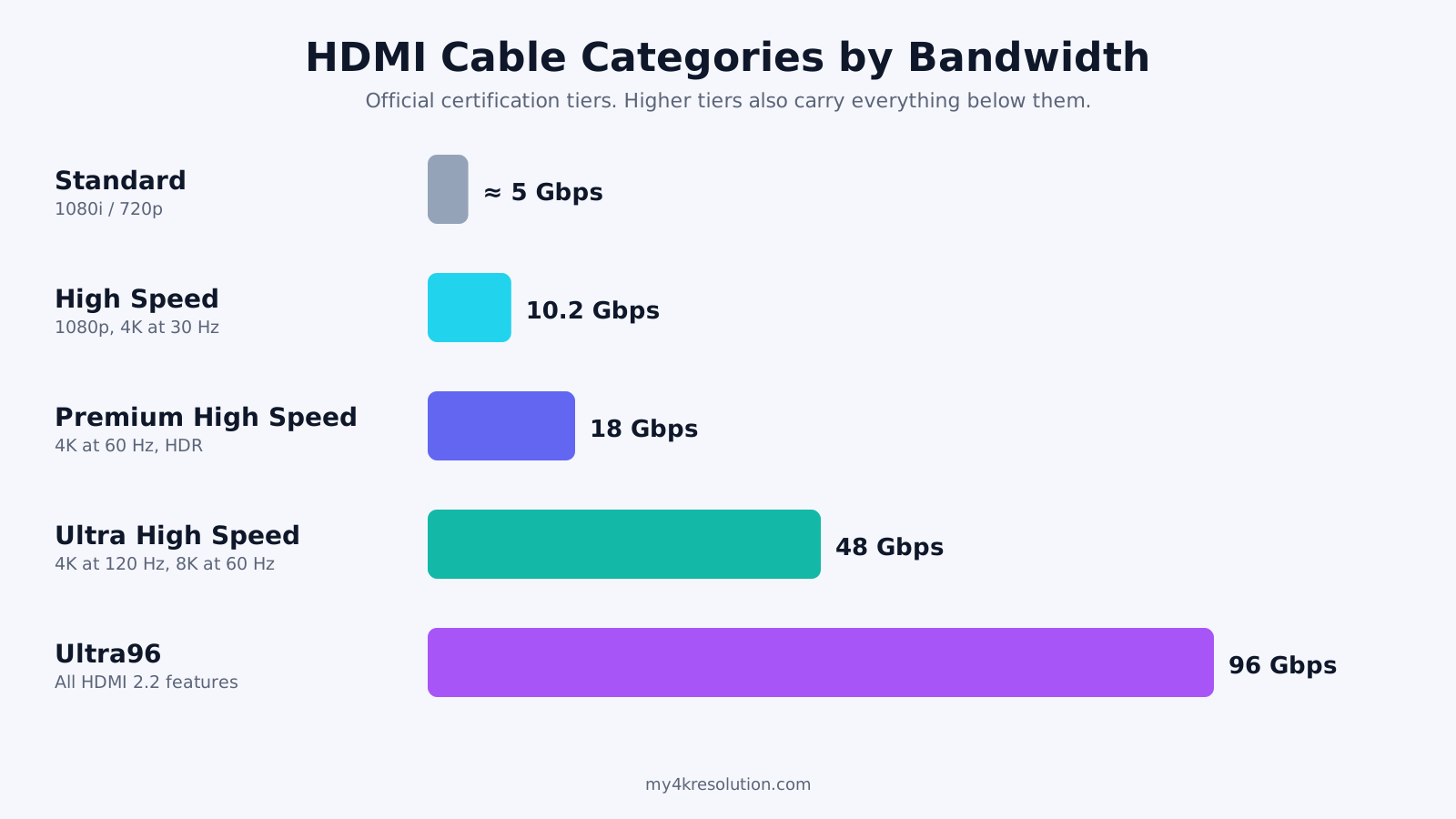
The HDMI Licensing Administrator describes the Premium High Speed category as tested and certified for 18 Gbps, including 4K at 60 Hz and HDR. High Speed cables are rated for up to 10.2 Gbps and 4K at 30 Hz, and they may carry some 4K 60 Hz signals in reduced color formats.
How Much Bandwidth Does 4K Really Need?
Different 4K signals need very different amounts of data, which is why “4K cable” is a meaningless label. We calculated the active pixel data for common signals using pixels × frames per second × bits per pixel. A 4K frame is 8,294,400 pixels, and full-color (RGB or 4:4:4) video uses 24 bits per pixel at 8-bit and 30 bits at 10-bit.
| Signal (full color) | Pixel data (approx.) | Cable category typically needed |
|---|---|---|
| 4K, 30 Hz, 8-bit | 6.0 Gbps | High Speed or better |
| 4K, 60 Hz, 8-bit | 11.9 Gbps | Premium High Speed or better |
| 4K, 60 Hz, 10-bit (HDR) | 14.9 Gbps | Exceeds what HDMI 2.0 carries uncompressed; devices usually use reduced color, or HDMI 2.1 with Ultra High Speed |
| 4K, 120 Hz, 8-bit | 23.9 Gbps | Ultra High Speed |
| 4K, 120 Hz, 10-bit (HDR) | 29.9 Gbps | Ultra High Speed |
Reading this table: these are pixel data rates only. A real HDMI link also carries blanking intervals, audio and encoding overhead, so it needs more than these figures. HDMI 2.0’s 18 Gbps link carries about 14.4 Gbps of actual data, which is why 4K at 60 Hz in 10-bit full color doesn’t fit, and devices fall back to reduced color (4:2:2 or 4:2:0) instead. That is the “HDR looks different over HDMI 2.0” issue many people meet. Devices can also use compression or reduced color to fit a signal in a narrower link, so real-world results vary by device.
Which Cable Should You Buy?
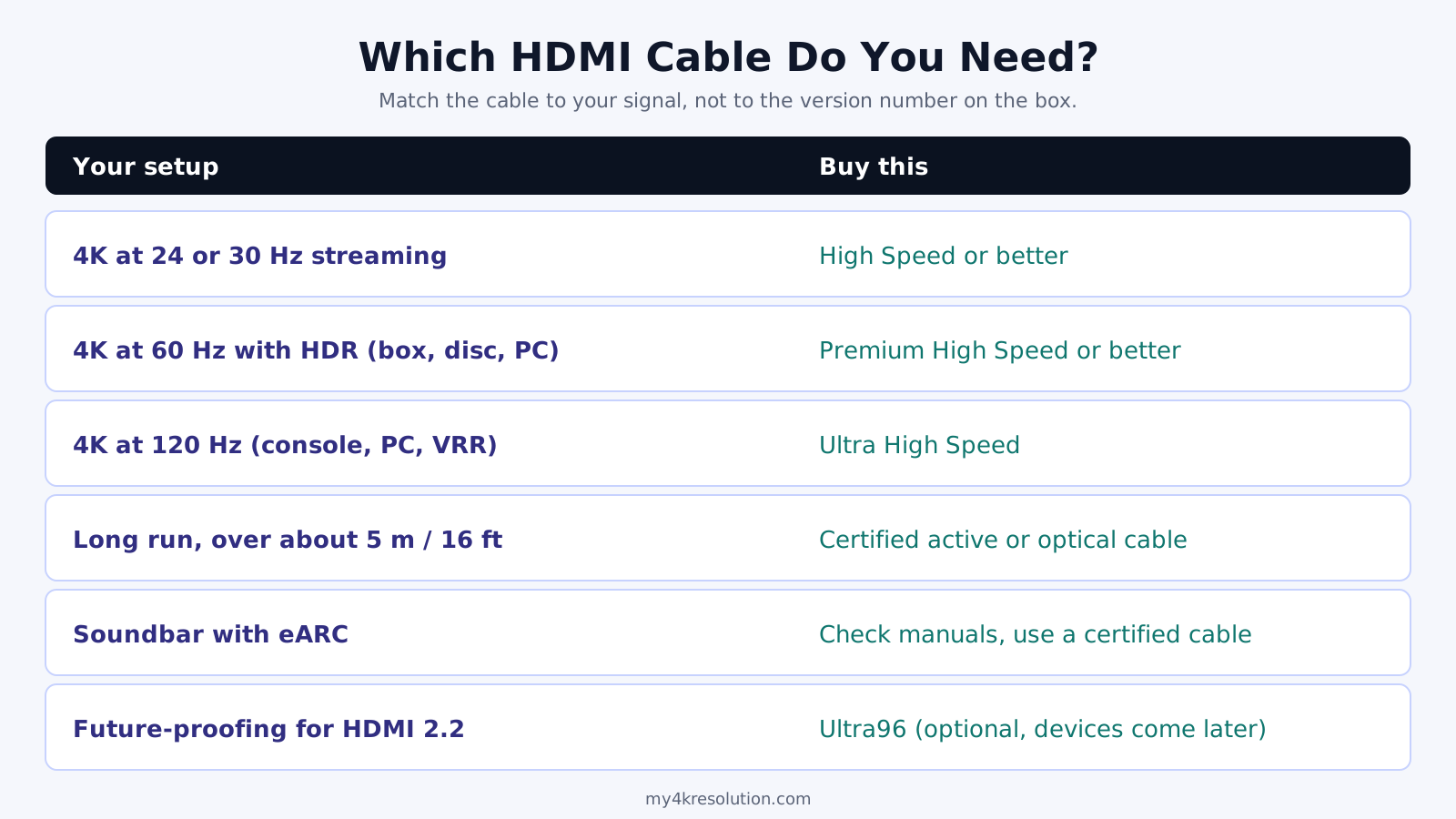
- Streaming box or Blu-ray at 4K 60 Hz with HDR: a certified Premium High Speed cable is enough.
- PS5, Xbox Series X or a gaming PC at 4K 120 Hz: buy a certified Ultra High Speed cable, and connect to the TV’s port that supports it. See 4K at 60 Hz vs 120 Hz.
- Soundbar or AV receiver with eARC: use a certified cable, and check the TV and soundbar manuals for any cable requirement. See the troubleshooting steps in 4K not working? Fix it step by step.
- When in doubt: a certified Ultra High Speed cable covers every current 4K use and costs little more than a lower tier. Check current prices rather than assuming.
Whichever cable you buy, it is only as capable as the weakest link. A TV port that does not support 4K at 120 Hz will not do so just because the cable can. Check each link as described in our signal-chain troubleshooting guide.
How to Spot a Genuine Certified Cable
- Look for the certification label on the package. HDMI’s official programs require Premium High Speed, Ultra High Speed and Ultra96 cables to carry an authentication label.
- Scan the QR code. It takes you to the HDMI verification page showing the cable’s certification status and speed tier. For Ultra96, each cable length is certified separately, so the code applies to that length only.
- Be wary of vague claims. “HDMI 2.1 cable”, “4K cable” and “8K cable” are marketing terms and not official categories. Not every cable labelled “HDMI 2.1” is certified to the Ultra High Speed standard.
- Check online listings too. Where a seller shows an official verification banner, use it. Otherwise, buy from a reputable seller or the manufacturer.
Do You Need an Ultra96 (HDMI 2.2) Cable?
HDMI 2.2 was finalized in 2025 and doubles maximum bandwidth from 48 Gbps to 96 Gbps. Its matching cable is branded Ultra96, and the first certified cables have started to appear. But the benefits, such as uncompressed 4K at 240 Hz and 8K at 60 Hz with full color, need HDMI 2.2 devices, and reports suggest mainstream hardware is not expected until around 2027.
For 4K at 60 Hz or 120 Hz you do not need Ultra96, because Ultra High Speed already has the bandwidth. Buy Ultra96 only if you specifically want to future-proof and the price is reasonable. It is not a way to improve today’s 4K picture. HDMI’s own materials say the Ultra High Speed cable remains the right choice for systems up to 48 Gbps.
Cable Length and Long Runs
Signal quality degrades with distance, and high-bandwidth signals are the most sensitive. Short certified cables, such as 1 to 3 meters, are the easiest. For long runs, often beyond about 5 meters (16 feet) at high bandwidth, passive copper becomes less reliable, so consider a certified active or fiber-optic cable. Optical HDMI cables are usually directional, so connect the labelled source end to the source device. Note that certification is per model and length, so a long run needs a cable certified at that length.
HDMI Cable Myths
- “Expensive cables give a sharper picture.” Digital video either arrives intact or doesn’t. A certified cheap cable and a certified expensive one deliver the same picture.
- “Gold-plated connectors improve quality.” They resist corrosion but don’t improve the signal.
- “My old HDMI cable is fine for 4K 120 Hz.” Probably not. Old cables were tested for lower bandwidth, so you may see dropouts or no signal.
- “An 8K cable is better for 4K.” “8K” on a box is marketing; look for Ultra High Speed certification, which does cover the use.
- “The cable decides the HDMI version.” The ports and devices decide it. The cable only has to carry the signal.
If Your Cable Still Doesn’t Work
Run through these in order: reseat both ends, power-cycle the TV and device, use the TV’s 4K-capable port, turn on its enhanced HDMI mode, and try a short, known-good certified cable. Our troubleshooting guide has the full checklist, including HDCP and PC-specific fixes.
Frequently Asked Questions
What HDMI cable do I need for 4K 60 Hz?
A certified Premium High Speed cable (18 Gbps) or better. Many High Speed cables work for some 4K 60 Hz signals, but Premium certification is the safer choice, especially for HDR.
What HDMI cable do I need for 4K 120 Hz?
A certified Ultra High Speed cable (48 Gbps), plus HDMI 2.1 ports on both your source and your TV.
Is there a difference between HDMI 2.0 and 2.1 cables?
Officially there is no such thing as an “HDMI 2.1 cable”. The relevant category is Ultra High Speed, which is what HDMI 2.1 features need.
Do I need an HDMI 2.1 cable for 4K 60 Hz?
No. A Premium High Speed cable is enough for 4K 60 Hz with HDR.
Are expensive HDMI cables worth it?
No. Price doesn’t improve picture quality. Certification, length and build quality matter. Buy a certified cable at a sensible price.
Do HDMI cables wear out?
Not in the sense of the picture degrading gradually, but connectors can loosen and cables can be damaged by bending or strain, causing flicker or dropouts. Replace a cable that behaves intermittently.
Should I buy Ultra96 now?
Only if you want to be ready for future HDMI 2.2 devices. It does not improve 4K at 60 or 120 Hz today.
Can I use DisplayPort instead of HDMI for 4K?
On a PC with a monitor that has DisplayPort, yes, and it is a common choice for high-refresh-rate 4K. TVs mostly offer HDMI only.
The Bottom Line
Buy by certified category: Premium High Speed for 4K 60 Hz with HDR, Ultra High Speed for 4K 120 Hz. Scan the QR code on the package, keep the run as short as practical, and don’t pay extra for marketing terms. If a certified cable doesn’t fix a problem, the cause is somewhere else in the signal chain.
Keep reading: 4K not working? Fix it step by step · 4K at 60 Hz vs 120 Hz · 4K resolution explained · Back to the 4K hub
Sources and Methodology
Cable categories and bandwidths follow the HDMI Licensing Administrator’s published certification programs (hdmi.org), checked in November 2026. HDMI 2.2 and Ultra96 information comes from HDMI’s own announcements and industry reporting. Pixel data rates are our own calculations (8,294,400 pixels × frame rate × bits per pixel) and exclude blanking and encoding overhead. Device support and prices change, so check each product’s specifications. We have not lab-tested individual cables for this article.
