
Quick answer: Plan for about 15 to 25 Mbps per 4K stream. Netflix’s help page recommends 15 Mbps or higher for 4K, and other services publish figures up to about 25 Mbps. For a single stream, a connection of about 35 Mbps gives comfortable headroom. For a household, multiply by the number of simultaneous 4K streams and add roughly 25% on top. Wi-Fi quality often matters more than the speed of your plan.
Recommended Speed by Streaming Service
There is no single universal number, because every service compresses its video differently. The table below lists the recommended speeds for 4K per stream as published or reported in November 2026. Only Netflix’s figure comes from its own help page; the others are reported by third-party guides that cite each service, so confirm on your provider’s support page before relying on them.
| Service | Recommended for 4K | Source type |
|---|---|---|
| Netflix | 15 Mbps or higher | Official help page |
| Prime Video | about 15 Mbps | Reported |
| Hulu | 16 Mbps | Reported |
| YouTube | 20 Mbps | Reported |
| Disney+ | 25 Mbps | Reported |
| Max | reports range up to 50 Mbps | Reported |
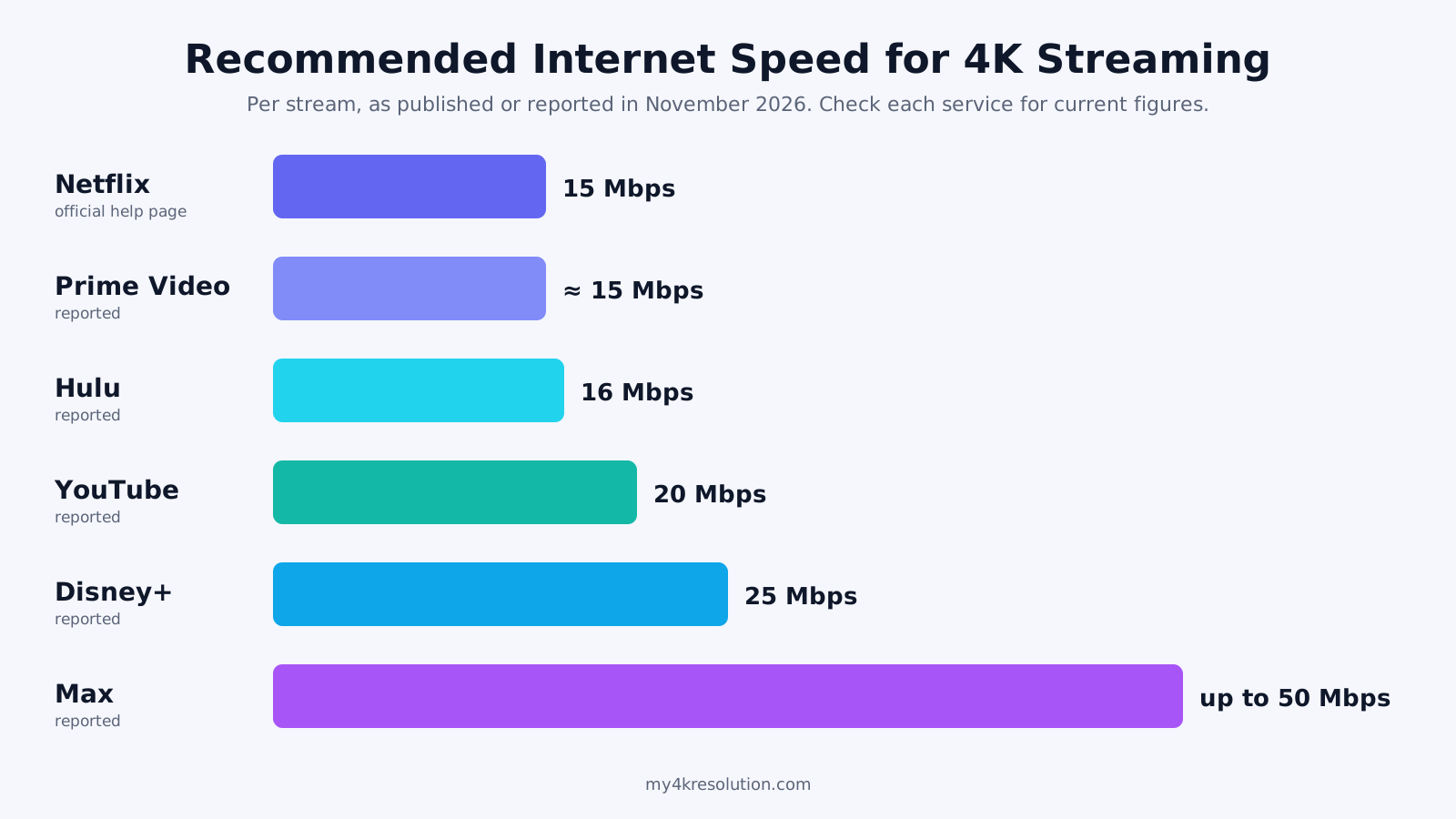
Watch out for old numbers. Some manufacturer and review pages still quote 25 Mbps for Netflix 4K, an older figure, while Netflix’s current help page says 15 Mbps. That is a good reason to check the source and its date before trusting any figure, including ours. Also, Dolby Vision and other HDR streams can need more than standard-range video.
Mbps vs MBps: Reading the Numbers Correctly
Internet speeds are measured in megabits per second (Mbps, lowercase b). File sizes and download managers often use megabytes per second (MBps, capital B). There are eight bits in a byte, so divide Mbps by 8 to get MBps. A 300 Mbps connection delivers about 37.5 MBps. Streaming recommendations are always in Mbps, so compare like with like.
How Much Speed Does Your Household Need?
The speed you buy has to cover every device at once, not just the TV. A simple planning method:
- Count the 4K streams that could run at the same time.
- Multiply by 15 to 25 Mbps each (use 25 if you watch Disney+ or want to be cautious).
- Add about 25% headroom for fluctuations and Wi-Fi overhead.
- Then add an allowance for everything else: video calls, gaming, cloud backups and downloads.
| Simultaneous 4K streams | Streams need | With 25% headroom | Plan to look for |
|---|---|---|---|
| 1 | 15–25 Mbps | 19–31 Mbps | about 20–35 Mbps |
| 2 | 30–50 Mbps | 38–63 Mbps | about 40–65 Mbps |
| 3 | 45–75 Mbps | 56–94 Mbps | about 60–95 Mbps |
| 4 | 60–100 Mbps | 75–125 Mbps | about 75–125 Mbps |
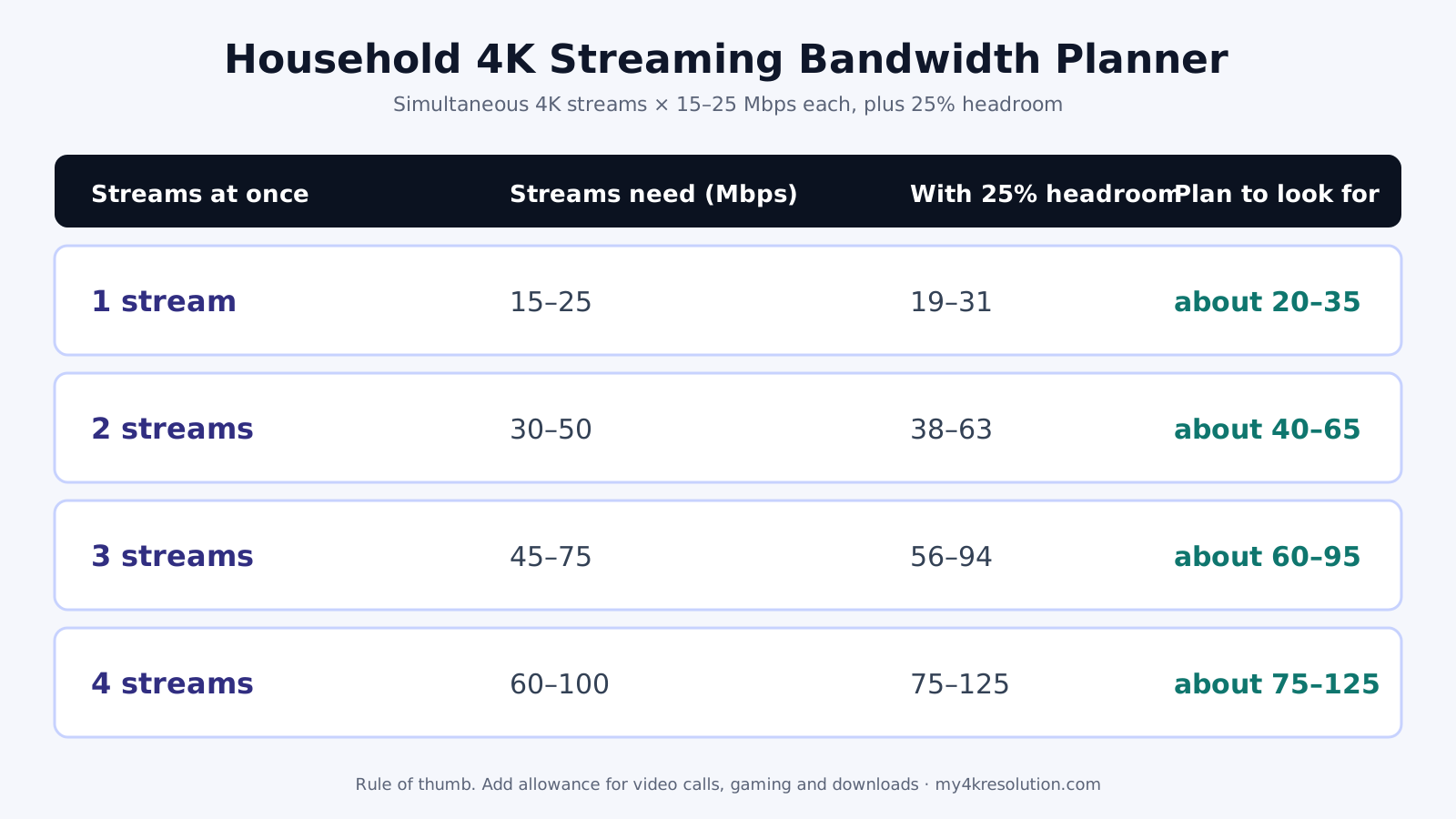
These figures come from the arithmetic above, not from lab testing, so treat them as a starting point. If your household streams in 4K on several TVs while others game or work from home, round up.
How Much Data Does 4K Streaming Use?
If your plan has a monthly data cap, bandwidth matters in a second way. Data use per hour equals bitrate ÷ 8 × 3,600. Services report real-world usage in a similar range; for example, Disney+ figures cited by third-party guides are around 7.7 GB per hour for 4K, and actual use varies with title and quality changes.
| Viewing time | At 15 Mbps (6.75 GB/hour) | At 25 Mbps (11.25 GB/hour) |
|---|---|---|
| 1 hour a day (30 days) | ≈ 203 GB | ≈ 338 GB |
| 2 hours a day | ≈ 405 GB | ≈ 675 GB |
| 4 hours a day | ≈ 810 GB | ≈ 1,350 GB |
These are upper estimates, since streams adapt and often run below the maximum. Even so, a household that streams 4K for several hours a day can get close to a 1 TB cap quickly, so check your provider’s limit. Many services let you lower the quality setting if data is a concern.
Why Your Real Speed Can Be Lower Than Your Plan
- Wi-Fi loss. Distance, walls, interference and a crowded channel can cut the speed reaching the TV far below your plan’s headline figure.
- Router or modem limits. If your plan is faster than your modem or router can handle, you’ll never see the full speed.
- Shared bandwidth. Phones, consoles and updates running in the background compete with the stream.
- Peak-time congestion. Evening slowdowns on your provider’s network or the service’s servers can lower quality even when your own connection is fine.
- Advertised vs sustained. “Up to” speeds are maximums. What matters for streaming is the speed you can sustain for two hours.
How to Test Your Speed Properly
- Test at the TV, not beside the router. A phone next to the router tells you little about the signal in your living room. Netflix’s help page suggests Fast.com in a browser, or the network check inside its app on TVs and set-top devices.
- Test at the busy time. Run it in the evening when you actually watch.
- Test more than once. One result can be a fluke.
- Compare with the table above. If you’re consistently below your service’s recommendation, quality will drop.
If speeds are fine but the picture still looks soft, the cause is probably elsewhere. Read why 4K streaming looks bad for the other causes, including compression, plan tier and TV settings.
How to Get a More Reliable 4K Stream
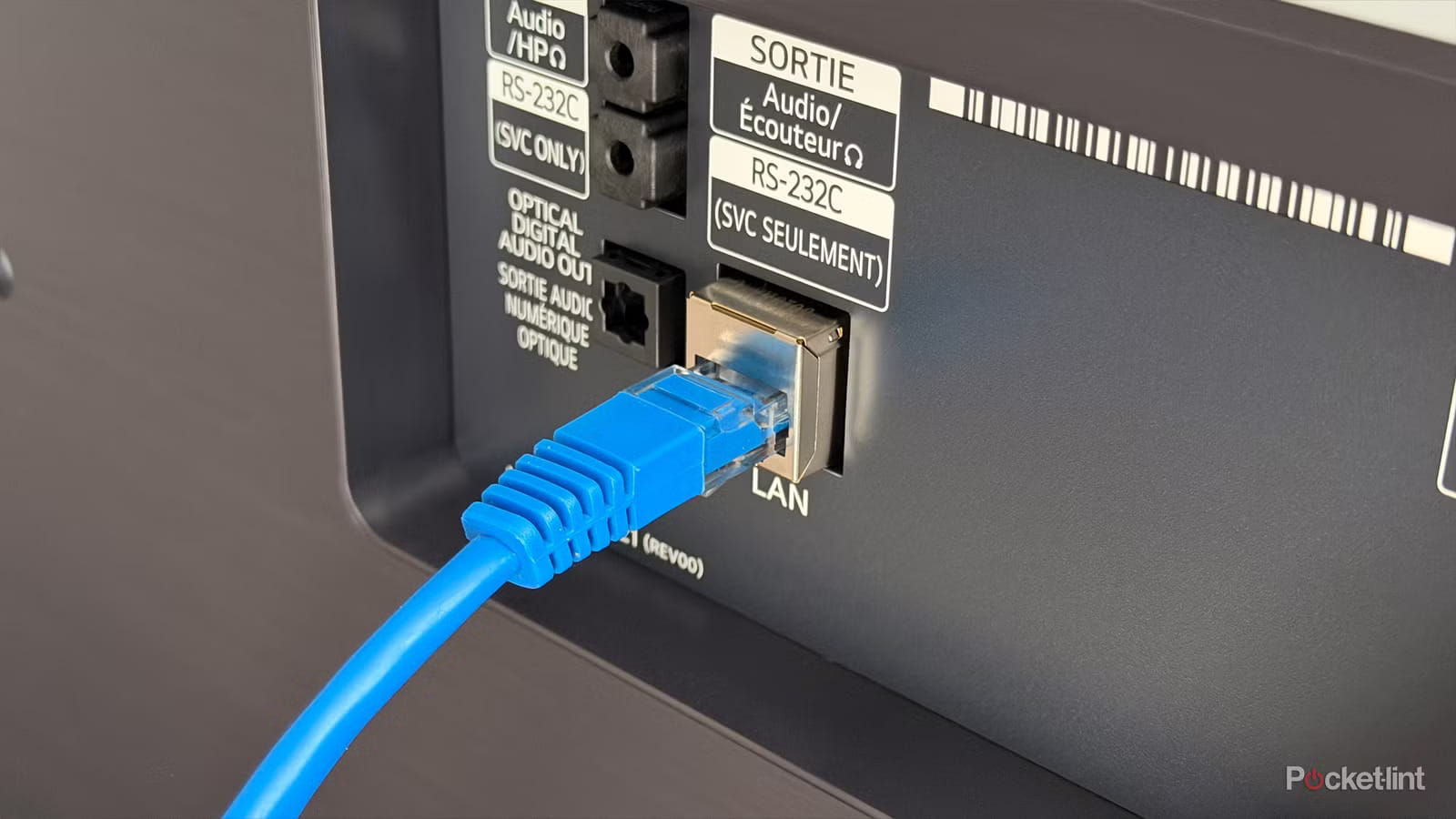
- Use Ethernet. A wired connection is usually the most stable option, if your TV or streaming box has a port.
- Improve the Wi-Fi. Move the router closer and higher, use the 5 GHz band where possible, and consider a mesh system for larger homes.
- Restart the modem and router now and then, and keep their firmware updated.
- Reduce background load. Pause large downloads and updates while watching.
- Check the whole chain. Plan, app, device, HDMI and settings all affect quality. Our 4K troubleshooting checklist walks through them.
- Know what you’re buying. Before you upgrade your plan, confirm that your TV and screen size will actually show the benefit. See whether a 4K TV is worth it and the viewing distance guide.
Frequently Asked Questions
How much internet speed do I need for 4K streaming?
Plan for about 15 to 25 Mbps per 4K stream, depending on the service. Netflix recommends 15 Mbps or higher.
Is 50 Mbps enough for 4K?
For one or two simultaneous 4K streams, usually yes, as long as the connection is stable and other devices aren’t using much bandwidth.
Is 100 Mbps enough for 4K?
Generally yes for a typical household, including several 4K streams at once, provided your Wi-Fi delivers that speed to each device.
Does 4K need more than 25 Mbps?
Most services recommend 25 Mbps or less, though some report higher figures for HDR formats or certain services. Check your provider.
Why is my 4K stream still blurry with fast internet?
Speed isn’t the only factor. Compression, plan tier, app and device limits, Wi-Fi quality and TV settings can all reduce quality.
Does upload speed matter for streaming?
Not for watching. Streaming relies on download speed. Upload matters for video calls and uploading content.
Do I need a special router for 4K?
Not usually, but a router with decent range and 5 GHz support helps. If Wi-Fi is weak at the TV, a wired connection or mesh system often helps more than a faster plan.
The Bottom Line
For most homes, 15 to 25 Mbps per 4K stream, plus headroom, is the number to plan around. Count your simultaneous streams, check what actually reaches the TV, and fix Wi-Fi before paying for a faster plan.
Keep reading: Why 4K streaming looks bad · 4K not working? Fix it · 4K resolution explained · Back to the 4K hub
Sources and Methodology
Netflix’s recommendation comes from the Netflix Help Center. Other services’ figures are as reported by third-party guides in November 2026 and may change, so confirm them with each provider. Data-use and household figures are our own calculations from bitrate (Mbps ÷ 8 × 3,600 seconds) and a 25% headroom assumption. We have not tested individual services or connections for this article.
